

Engines
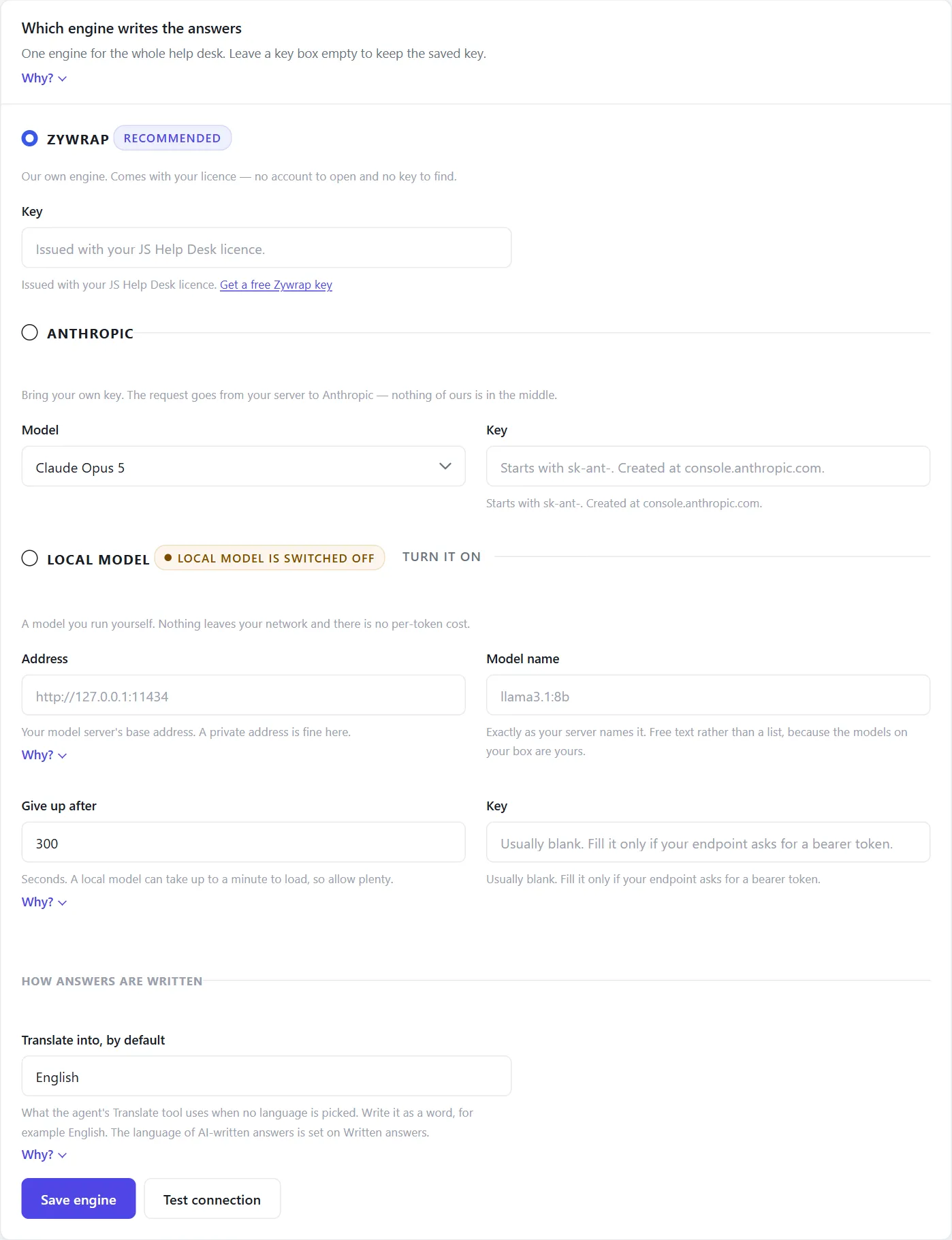
An engine is what writes AI text: Copilot summaries and drafts, written answers on the ticket form and automatic replies. The help desk uses one engine at a time, chosen under AI Agent → Settings → Engine & key. Suggested articles and past replies don’t need an engine at all.
| Engine | Lane | Who runs it | Cost |
|---|---|---|---|
| Zywrap (Recommended) | Hosted model | JS Help Desk’s own hosted engine | Drawn from the allowance that comes with your licence |
| Anthropic | Hosted model | Anthropic, with your own key | Billed to your Anthropic account |
| Local model | Local model | You, on your own hardware | No per-token cost |
An engine is only used when its lane is switched on under What AI may do. A new install uses Zywrap until you choose otherwise. The chosen engine is marked In use when it works, or Chosen, not working when it still lacks a key, an address or an open lane.
Zywrap is the default engine. The request goes from your site to
api.zywrap.com.
What it needs: a Zywrap key in the Key box. The hint under the box reads Issued with your JS Help Desk licence., with a Get a free Zywrap key link to zywrap.com. Until a key is stored, Zywrap cannot answer.
There is no model to choose. When Zywrap’s response says how many tokens a run used, Usage & Cost records them; when it doesn’t, the run is recorded with its tokens not reported rather than as zero.
With a Zywrap key stored, two more tabs appear under Usage & Cost: Zywrap requests and Zywrap errors.
Bring your own key. The request goes straight from your server to Anthropic, with nothing of ours in between: their server, their bill, their data agreement.
What it needs:
| Field | What to enter |
|---|---|
| Model | One of the models in the table below. Each choice shows its price per million tokens, in and out. |
| Key | Your Anthropic API key. It starts with sk-ant- and is created at console.anthropic.com. |
| Model | $ per million tokens in / out |
|---|---|
| Claude Haiku 5.5 (recommended) | 0.10 / 0.50 |
| Claude Sonnet 5.5 | 2 / 10 |
| Claude Opus 5.5 | 4 / 20 |
| Claude Opus 5 | 5 / 25 |
| Claude Sonnet 5 | 2 / 10 |
| Claude Haiku 4.5 | 1 / 5 |
If no model has been saved, Claude Haiku 5.5 is used, the cheapest model on the list. A model you saved earlier is kept.
The plugin waits up to 90 seconds for a reply.
A model you run yourself, with Ollama, LM Studio, vLLM, llama.cpp or anything else that answers OpenAI-style chat completions. Nothing leaves your network.
What it needs:
| Field | What to enter | Default |
|---|---|---|
| Address | Your model server’s base address, for example http://127.0.0.1:11434. A private address is fine. The path /v1/chat/completions is added for you, so pasting the base address or the full address both work. |
Empty |
| Model name | Exactly as your server names it, for example llama3.1:8b. |
Empty |
| Give up after | Seconds to wait, 10 to 900. A local model can take up to a minute to load, so allow plenty. | 300 |
| Key | Usually blank. Fill it only if your endpoint asks for a bearer token. | Empty |
The address must start with http:// or https://, or the save is refused with
“The local model address must be an http or https URL”.
If your server stops PHP requests sooner than Give up after, the screen warns
you, for example “This server stops a request after 120 seconds, so 300 is never
reached.” Lower the wait, or ask your host to raise max_execution_time.
The local model is ready once both Address and Model name are filled in.
Switching engines
Section titled “Switching engines”- On Engine & key, select the engine and fill in what it needs.
- If its lane is off, the engine’s card has a box, Also switch on the “Local model” lane when I save with this engine chosen (named after its lane). Tick it to open that lane, and nothing else, as you save; it is already ticked for the engine currently chosen. Or switch the lane on yourself under What AI may do and click Save switches.
- Click Save engine.
- Click Test connection.
Each engine keeps its own key, so switching from Anthropic to a local model and back does not lose your Anthropic key. A key box left empty always means “keep what is stored”; the screen never shows a stored key back to you. To delete a key, click Forget it under its box.
If you save an engine whose lane is still off, the screen says “Saved, but nothing will be sent yet: the Hosted model lane is switched off. Tick “Also switch on” beside the engine, or switch it on under What AI may do.” Every engine change is recorded in the Audit journal.
Test connection
Section titled “Test connection”Test connection asks the chosen engine to reply with one word, through the same path a real answer takes, including the lane check and redaction. The result is shown at the top of the screen and on the card:
- Answered in 412 ms and a Last test line with the reply, the engine and how long ago.
- Last test failed and the reason.
The test is a real request, so it is counted on Usage & Cost.
What the errors mean
Section titled “What the errors mean”| Message | What to do |
|---|---|
| AI is switched off for this site. | Tick Allow this help desk to use AI. |
| Hosted model is switched off for this site. (or Local model) | Tick that lane under What AI may do. |
| No AI key is set up yet. Add one on the AI Agent screen. | Enter a key for Zywrap or Anthropic. |
| No local model is set up yet. Add its address and model name on the AI Agent screen. | Fill in Address and Model name. |
| The AI provider rejected the key. | The key is wrong or revoked. Enter it again. |
| The provider does not offer the model this is set to use. | Pick another Model. |
| The AI provider is rate limiting this site. | Wait a moment and try again. |
| The AI provider is unavailable right now. | The provider is down or overloaded. Nothing was changed; try again shortly. |
| Could not reach the AI provider: … | Your server could not connect at all. On shared hosting this is usually outbound HTTPS being blocked. |
| Could not reach the local model: … | The model server is not running, or not reachable from the web server. |
| The local model returned nothing. | Check the Model name matches a model your server has loaded. |
| The model declined to answer this one. | Anthropic’s model refused the request. Nothing was written. |
| The Zywrap engine returned nothing. | Details are under System → System Errors. |