

The dashboard
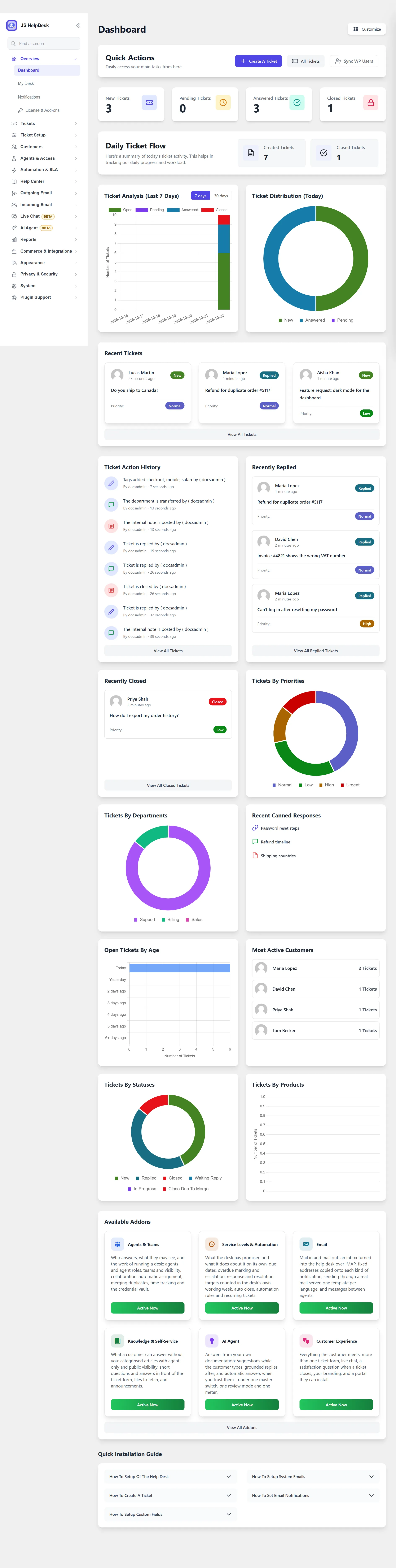
Help Desk → Dashboard is the help desk’s home screen in WordPress. Only administrators see it; agents who open it are taken to Tickets instead.
At the top
Section titled “At the top”Quick Actions are shortcuts:
| Button | What it does |
|---|---|
| Create A Ticket | Opens Create Ticket. |
| All Tickets | Opens the Tickets screen. |
| Sync WP Users | Copies WordPress users who have no help desk record into the help desk. Nothing is added to WordPress. |
| Agents | Opens the agents list. Only with the Agents & Teams pack. |
The four counts below them cover tickets created in the last month:
| Count | Tickets that are |
|---|---|
| New Tickets | New, with no reply yet. |
| Pending Tickets | Have at least one reply, but aren’t answered or closed. |
| Answered Tickets | Answered by your team and waiting for the customer. |
| Closed Tickets | Closed in the last month. |
Click any count to open Tickets.
Daily Ticket Flow shows today alone: Created Tickets and Closed Tickets.
Quick Actions, the counts and Daily Ticket Flow are always shown.
The panels
Section titled “The panels”| Panel | Shows |
|---|---|
| Ticket Analysis | A line chart of Open, Pending, Answered and Closed tickets by the day they were created. Switch between 7 days and 30 days. |
| Ticket Distribution (Today) | New, answered and pending tickets among those created today. |
| Recent Tickets | The three newest tickets, with View All Tickets. |
| Unassigned Tickets | The three newest open tickets nobody is assigned to. Only with the Agents & Teams pack. |
| Ticket Action History | The last eight things done to tickets, across the help desk. |
| Recently Replied | The three tickets most recently replied to. |
| Recently Closed | The three most recently closed tickets. |
| Tickets By Priorities, Tickets By Departments, Tickets By Statuses, Tickets By Products | Charts of every ticket, of all time. |
| Agent Performance | For the top five agents: assigned, open, closed, pending and overdue tickets. Only with the Agents & Teams pack. |
| Recent Canned Responses | Up to six canned responses. |
| Active Timers | Timers running on tickets. Only with the Agents & Teams pack’s time tracking. |
| Open Tickets By Age | Open tickets raised today, yesterday, 2–5 days ago and 6+ days ago. |
| Most Active Customers | The four customers with the most tickets. |
| Available Addons | Add-on packs not yet active on this site. See below. |
| Quick Installation Guide | Short videos on setting up. See below. |
The 7 days / 30 days switch only changes Ticket Analysis. Each administrator’s choice is remembered for them.
Available Addons
Section titled “Available Addons”Shows up to six of the nine add-on packs that aren’t active on this site, each with a short summary and a button:
- Install Now for a pack that isn’t installed;
- Active Now for a pack that is installed but switched off. It opens Plugins.
View All Addons opens License & Add-ons when more than six are left. The panel disappears by itself once all nine packs are active.
Quick Installation Guide
Section titled “Quick Installation Guide”Five videos, each opening on YouTube: How To Setup Of The Help Desk, How To Setup System Emails, How To Create A Ticket, How To Set Email Notifications and How To Setup Custom Fields. Hide it with Customize once you’re set up.
Customize
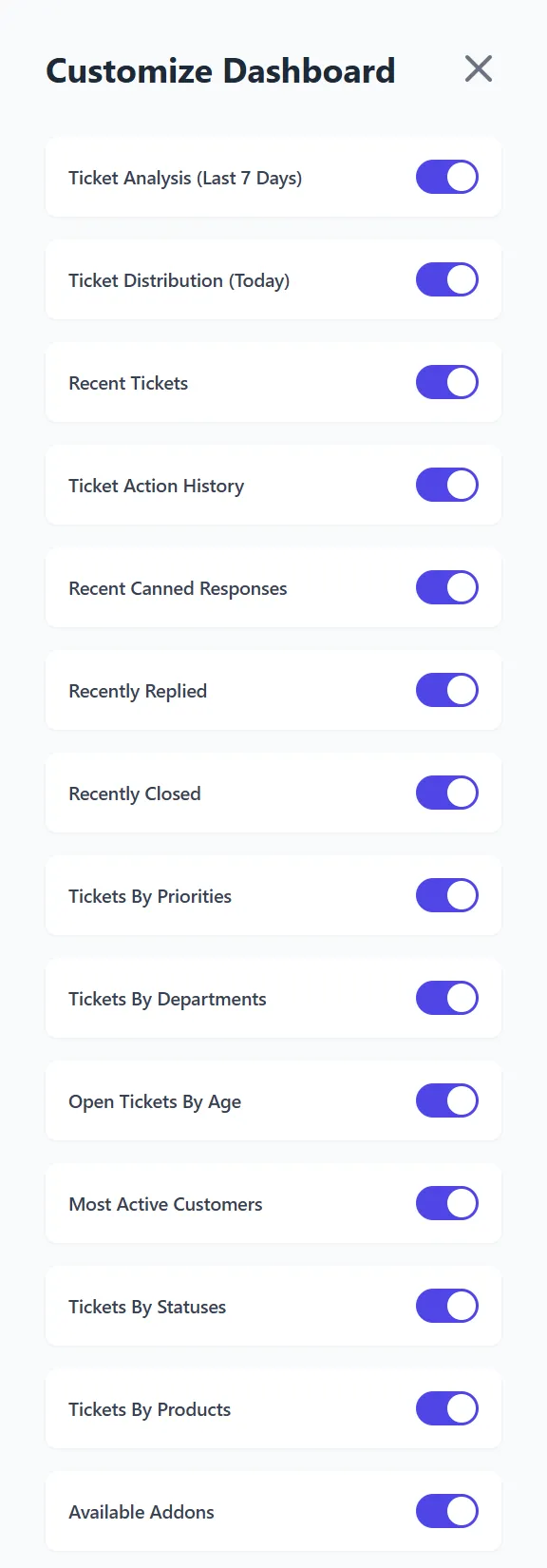
Section titled “Customize”Click Customize at the top right. Customize Dashboard lists every panel in the table above with an on/off switch. Panels that need a pack are listed only when the pack is active.
Renewal offer
Section titled “Renewal offer”If your licence was carried over from before 5.0 and a loyalty offer applies, a card at the top shows it, with Manage subscription and See what is included. Got it hides it until 30 days before the offer starts. See Licence.
WordPress dashboard widgets
Section titled “WordPress dashboard widgets”The plugin adds two widgets to WordPress’s own Dashboard for administrators and anyone who can work tickets:
| Widget | Shows |
|---|---|
| Your help desk’s title (or JS Help Desk) | Latest Tickets: five tickets, with subject, who they’re from and priority. Click a subject to open it. |
| Ticket Stats | New, Answered, Pending and Overdue tickets from the last month. |
There’s no help desk setting to remove them. Each person can hide them with Screen Options at the top of the WordPress dashboard.