

Help while writing
Above the reply editor, Write this reply with help: offers the ways of getting text into the box without typing it from scratch. Each one fills the box; none of them sends anything. You still read it, change it and click Post Reply.
These are on the Public reply tab, so a Light Agent doesn’t have them.
Canned responses
Section titled “Canned responses”Saved answers to the questions you get every week, such as Password reset steps or Refund timeline.
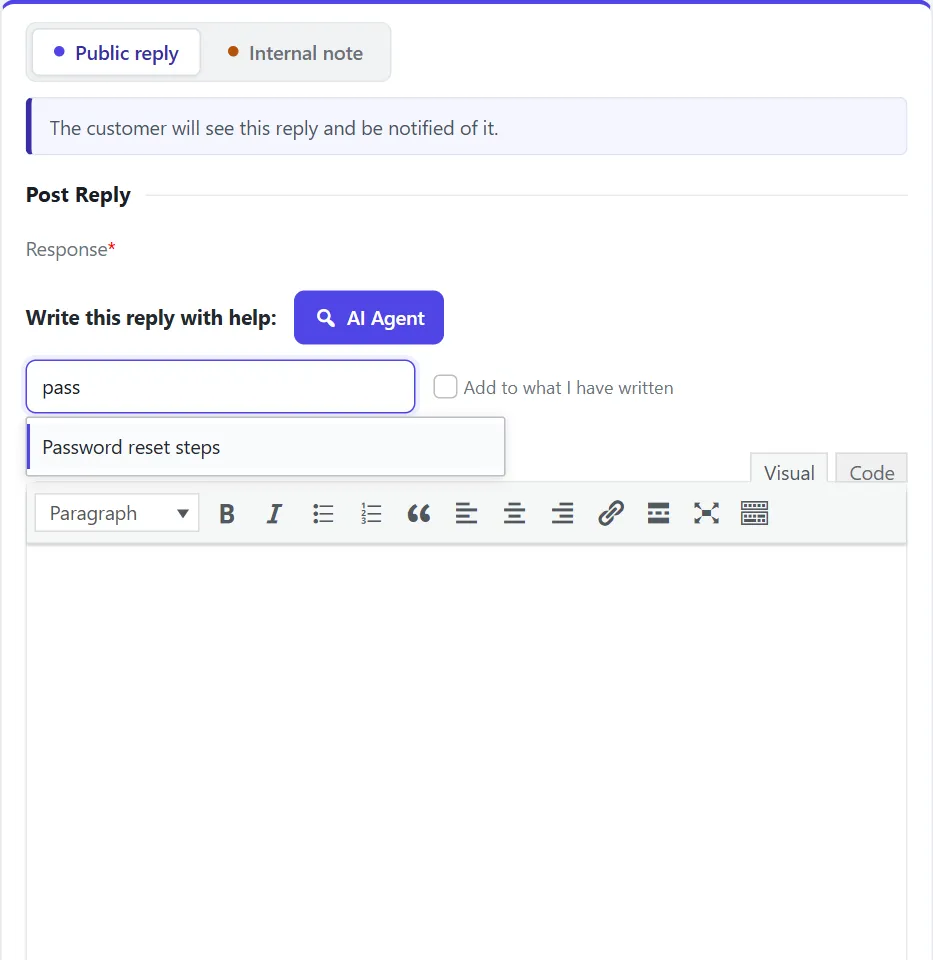
- Click in the Canned response box and type a few letters of its title.
- Pick it from the list with the mouse, or with the arrow keys and
Enter.Esccloses the list. - Decide first whether to tick Add to what I have written. Ticked, the answer is added to what is already in the box. Unticked, it replaces everything in the box.
To write or change canned responses, open Canned Responses from the JS Help Desk menu. See Canned responses.
AI Agent: answers already written here
Section titled “AI Agent: answers already written here”AI Agent finds answers your team has already written on this site and offers them under Suggested replies:
- past replies to tickets like this one, and
- with the AI Agent pack, your knowledge base, FAQs and canned responses as well.
Open a suggestion to read its replies, then use the one you want. Where it is offered, Show narrows the list to Everything or Only preferred tickets: tickets your team has marked as good examples. Hide closes the list.
Whether a ticket’s replies may be suggested later is set on that ticket under AI suggestions from this ticket: Use it when it matches, Prefer it — a good example or Never use it. Nothing leaves your site.
AI Copilot
Section titled “AI Copilot”When your administrator has connected an AI service, the reply box also shows an AI Copilot panel. It works on the ticket in front of you, and only when you press a button.
| Button | Gives you |
|---|---|
| Summarize | A short catch-up: what the customer wants, what has been tried, what is still open. |
| Key details | The useful facts pulled out of the thread. |
| Translate | The ticket in the language you type in the into box. |
| Draft a reply | A first draft of an answer. |
“Only you see the result. Nothing is sent to the customer.” A draft goes into the reply box only when you click Use in reply.
The Copilot works from the ticket, not from general knowledge, and is asked to say when something is missing rather than guess. Read what it gives you before you use it.
Unlike AI Agent, the Copilot passes the ticket’s conversation to the AI service your administrator set up. Recent uses are kept in a log your administrator can see.
Suggestions in the portal
Section titled “Suggestions in the portal”In the portal desk, Write this reply with help: has Canned response and AI Agent. The AI Copilot panel is there too, in the reply area, as on the WordPress desk.