

Support Entitlements
Commerce & Integrations → Entitlements sets recurring limits, such as “40 tickets a month for each company” or “10 a quarter for this product”. When an account reaches its limit, its next new ticket is refused with a message. Tickets it already has are never touched, and both sides can still reply.
For prepaid tickets that customers buy, use Paid Support instead. If you use both, a ticket must pass both.
The master switches
Section titled “The master switches”The top of the screen, Whether it is doing anything, shows four counts and the switches that govern every rule.
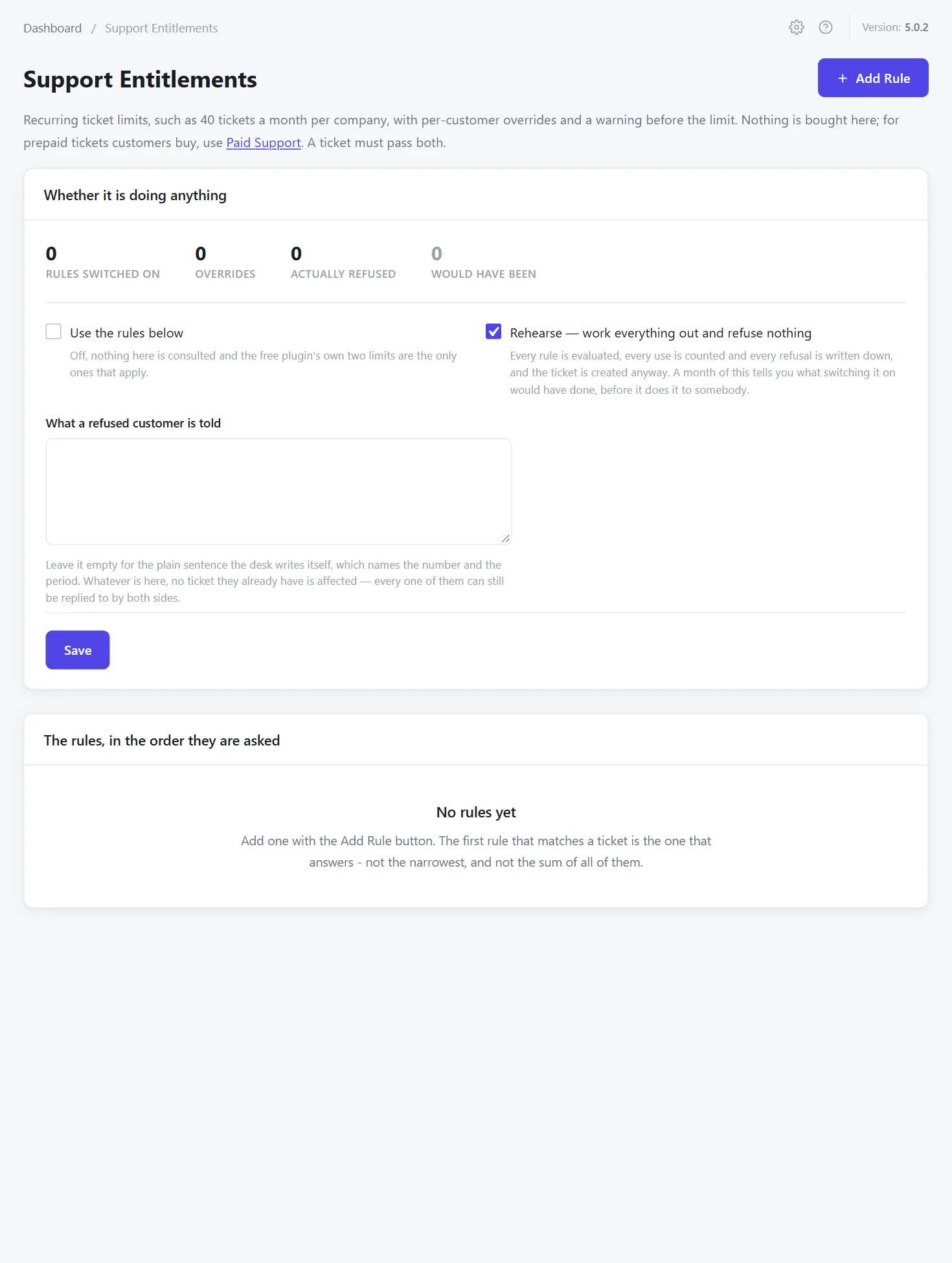
| Count | Means |
|---|---|
| Rules switched on | Rules whose On box is ticked. |
| Overrides | Per-customer numbers in force, across all rules. |
| Actually refused | Tickets turned away, among the last 100 refusals recorded. |
| Would have been | Tickets that would have been turned away while rehearsing, among the same 100. |
| Setting | Default | What it does |
|---|---|---|
| Use the rules below | Off | Off, nothing on this screen is consulted, and only the free plugin’s own ticket limits apply. |
| Rehearse — work everything out and refuse nothing | On | Every rule is worked out, every ticket is counted and every refusal is written down, but the ticket is created anyway. |
| What a refused customer is told | Empty | Your own refusal message, up to 400 characters. Empty, the customer sees “This account has used its 40 tickets for a month. The tickets already open are unaffected and can still be replied to.” with your rule’s number and period. |
Click Save. While both Use the rules below and Rehearse are on and at least one rule is switched on, the Entitlements menu item shows a 1 badge, as a reminder that nothing is being refused yet.
Adding a rule
Section titled “Adding a rule”Click Add Rule.
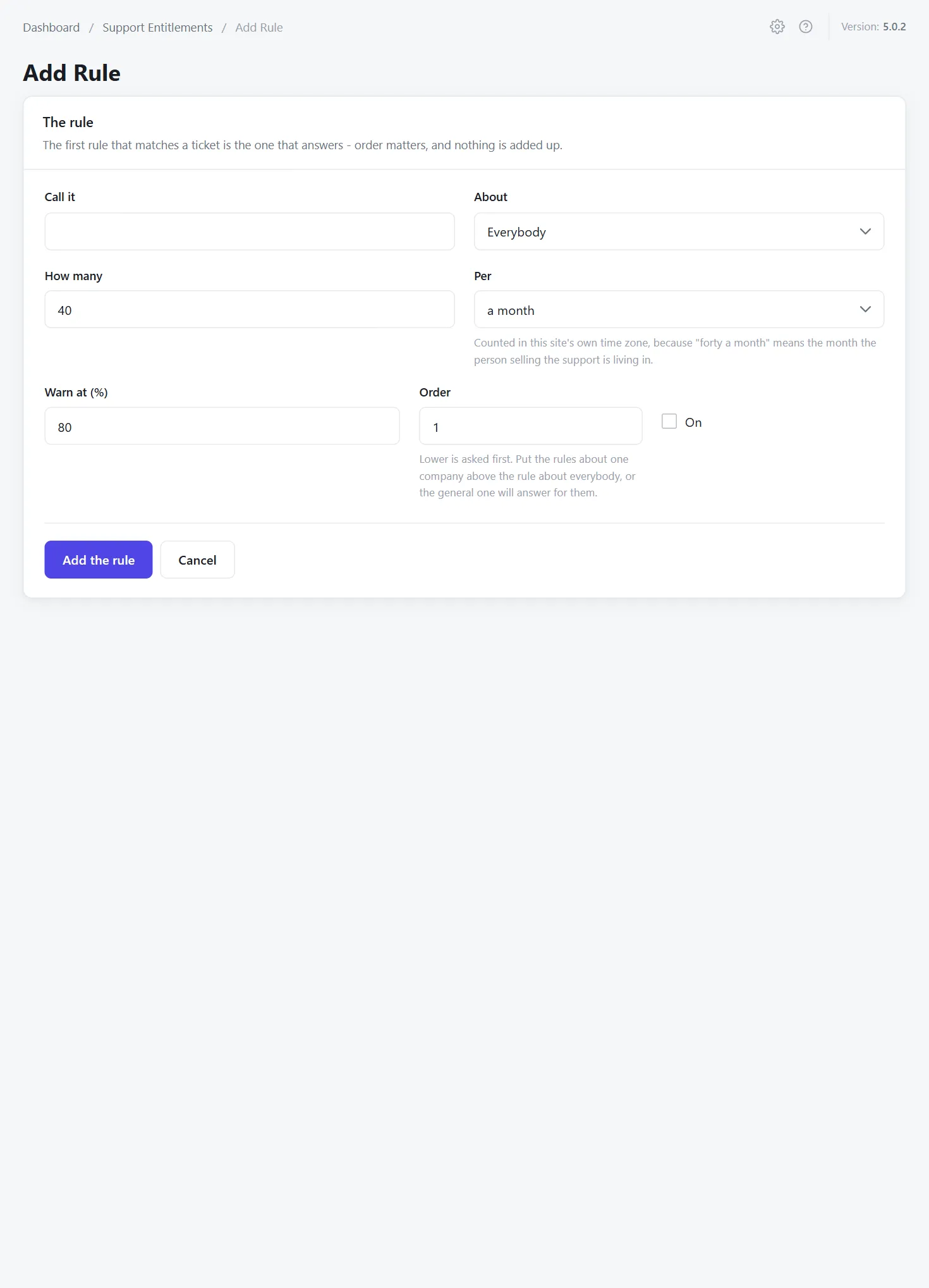
| Field | Default | What it does |
|---|---|---|
| Call it | — | The rule’s name. Required: refusals are recorded under it. |
| About | Everybody | Who the rule applies to. See Who a rule counts. |
| Which one | — | The company, customer, product or plan. Not shown for Everybody. Companies and products are picked from a list; a customer is an e-mail address (recent customers are suggested as you type); a plan is a name. |
| How many | 40 | New tickets allowed in each period. At least 1. To cut everyone off, switch the rule off instead. |
| Per | a month | a day, a week, a month, a quarter, a year, or ever — it does not come back. Periods follow your site’s time zone; weeks are calendar (ISO) weeks. |
| Warn at (%) | 80 | When the account has used this share of its allowance, the customer is told how many are left. 0 turns the warning off. |
| Order | Next free number | Rules are asked in this order, lowest first. |
| On | Off | Whether the rule is used. A new rule is off until you tick it. |
Click Add the rule. To change one later, click its name or Edit in The rules, in the order they are asked. Delete removes the rule and everything it has counted; no ticket is affected.
Which rule answers
Section titled “Which rule answers”For each new ticket, the help desk goes down the rules in order and stops at the first one that applies to it. That rule alone decides: rules are never added together, and a narrower rule further down is never reached. So put rules about one company or customer above the rule about everybody.
Who a rule counts
Section titled “Who a rule counts”| About | Applies to | Counted per |
|---|---|---|
| Everybody | Every ticket. | Company, for people who belong to one; otherwise per customer. |
| One company | People the company covers: its named people and its e-mail domains (Companies). | The company. Everyone in it shares one allowance. |
| One customer | That e-mail address. | That customer. |
| One product | Tickets where the customer chose that product. The Product question must be on the form (Products). | Company or customer, within the product. |
| One support plan | Customers on that plan, matched without regard to capitals. | Customer, within the plan. |
A customer’s plan is the product name of their Paid Support credits that expire soonest. With no credits, it is the first product of their active WooCommerce Subscriptions subscription. Without either, plan rules never apply.
What customers see
Section titled “What customers see”- Below the warning level: nothing.
- At or past it: after their ticket is created, “Your account has 3 new tickets left this month.” The last one allowed says “That was the last new ticket your account can open this month. Replies on your open tickets are not affected.” No warnings are shown while rehearsing.
- Over the limit: the ticket isn’t created, and they see your refusal message.
Who has used what
Section titled “Who has used what”Open a rule to see Who has used what, this period: each account with Used, Of, Left, and a Used up or Near the limit marker.
Use is recorded when each ticket is raised, not counted back from the tickets. Deleting, merging or moving a ticket never gives an allowance back.
Overrides
Section titled “Overrides”Their own number gives one account a different allowance under this rule. Type the number and click Set; Clear puts them back on the rule’s own number. An override lasts until you clear it, in every period. 0 means this account gets nothing under this rule, while everyone else carries on.
An account appears in this list only once it has used something this period, so you can only set an override for it from then on.
What has been turned away
Section titled “What has been turned away”What has been turned away lists the latest 25 refusals: When, Who, Under (rule name, used and allowance) and Really?, which says refused or rehearsed — the ticket was created. The last 100 are kept.