

Satisfaction survey
Reports → Reports → Satisfaction asks customers one question when their ticket closes, by e-mail, with every possible answer as a link. One click records the answer. The customer doesn’t need an account or a password. The same screen shows what the answers add up to; see Satisfaction results. Only WordPress administrators can open it.
The survey is off until you switch it on.
Switching it on
Section titled “Switching it on”-
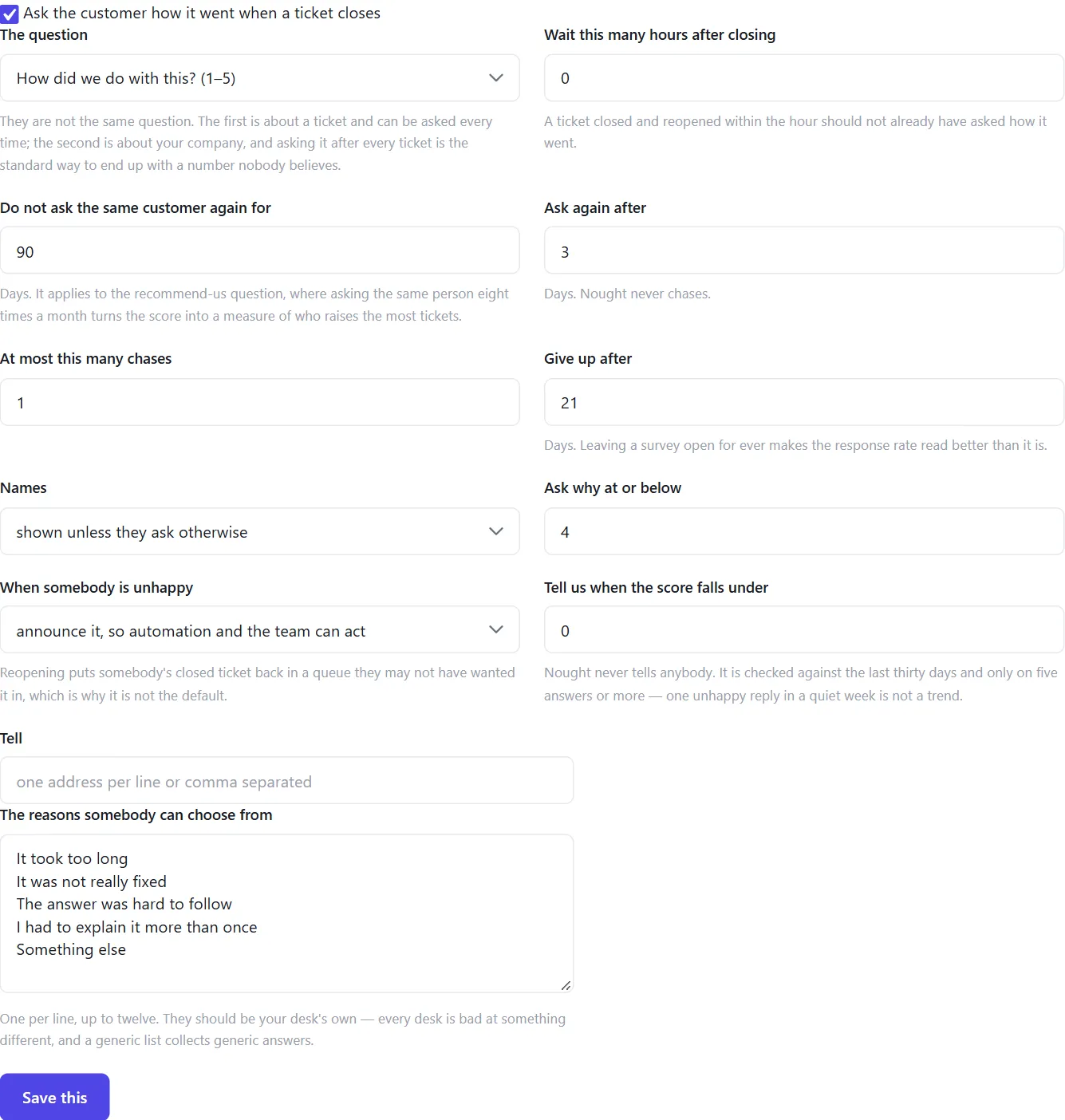
Go to Reports → Reports → Satisfaction and scroll to How and when people are asked.
-
Tick Ask the customer how it went when a ticket closes.
-
Check the settings below, then click Save this. You see “Saved.”
The next ticket to close starts the first survey.
The settings
Section titled “The settings”| Setting | Default | What it does |
|---|---|---|
| The question | How did we do with this? (1–5) | The other choice is Would you recommend us? (0–10). The first is about the ticket; the second is about your company (a Net Promoter Score). |
| Wait this many hours after closing | 1 | How long after the close the e-mail goes out, from 0 to 720. The wait gives a ticket that is closed and quickly reopened the chance to settle first. |
| Do not ask the same customer again for | 90 | Days, up to 730. Applies only to the recommend-us question, and only to customers with an account. 0 means no gap. |
| Ask again after | 3 | Days before a reminder, up to 60. 0 never sends a reminder. |
| At most this many chases | 1 | Reminders per survey, from 0 to 3. |
| Give up after | 21 | Days, from 1 to 365. After this a survey that hasn’t been answered is closed, and its links stop working. |
| Names | shown unless they ask otherwise | always shown, shown unless they ask otherwise (the customer gets a Do not show my name with this box) or never shown. |
| Ask why at or below | 4 | When the score is this or lower, the customer is offered your list of reasons. From 0 to 10. Left at 4 on the 0–10 question, only scores 0 to 4 are asked why. |
| When somebody is unhappy | announce it, so automation and the team can act | See Unhappy answers. |
| Tell us when the score falls under | 0 | An e-mail alert, from 0 to 100. 0 never sends one. |
| Tell | Empty | Who gets the alert. One address per line or comma separated. |
| The reasons somebody can choose from | Five reasons, starting It took too long | One per line, up to twelve, 60 characters each. |
The default reasons are It took too long, It was not really fixed, The answer was hard to follow, I had to explain it more than once and Something else. Replace them with the things your desk actually gets wrong.
What the customer experiences
Section titled “What the customer experiences”Each ticket is asked about once, ever. A ticket that is closed, reopened and closed again is not asked twice.
-
After the wait, the customer gets a plain-text e-mail. For the 1–5 question the subject is How did we do with followed by the ticket ID; for the 0–10 question it is One question, if you have a moment. The e-mail lists each score with its own link.
-
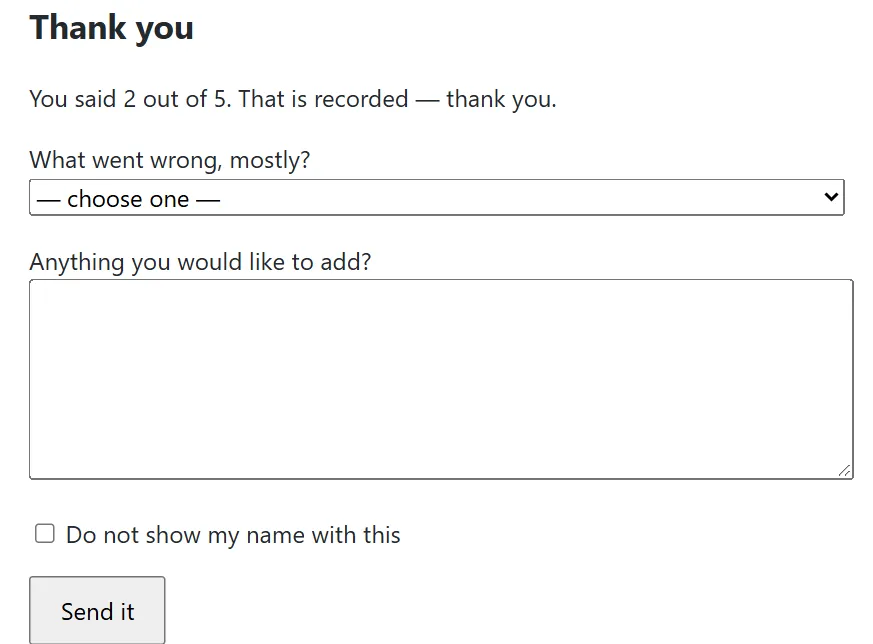
Clicking a score records it straight away. A page opens saying, for example, You said 4 out of 5. That is recorded — thank you.
-
If the score is at or below Ask why at or below, the page offers What went wrong, mostly? with your reasons. Everyone gets Anything you would like to add?, and the name box if Names allows it. Send it saves these too. Closing the page instead is fine; the score is already saved.
-
If nothing has been answered after Ask again after days, a reminder goes out with the same links and the line If you have already answered, or you would rather not, please ignore this — we will not ask again.
While the survey is open, clicking a different score changes the answer. Once it has been given up on, a link shows That link is not one of ours and nothing is recorded.
E-mails go out through the help desk’s background jobs. If your site has no job queue, the hourly pass sends them instead, so they can be up to an hour later than the wait you set.
Unhappy answers
Section titled “Unhappy answers”An answer counts as unhappy at 1 or 2 on the 1–5 question, and at 0 to 6 on the 0–10 question. When somebody is unhappy decides what follows:
| Option | What happens |
|---|---|
| record it and nothing else | The answer is saved. |
| announce it, so automation and the team can act | The answer is saved and an internal event is raised for other code to act on. No pack in this release acts on it, so on its own this behaves like the first option. |
| reopen the ticket | The ticket’s status goes back to New. No e-mail is sent and nothing is written to the ticket’s history. The internal event is raised as well. |
The score alert
Section titled “The score alert”Once an hour, if Tell us when the score falls under is above 0 and Tell has an address, the score for the last 30 days is checked. When it is below your figure and comes from at least five answers, an e-mail titled Satisfaction has fallen goes to those addresses. It is sent once per fall: you aren’t told again until the score has recovered and fallen a second time.
To read the answers, see Satisfaction results.