

Service level policies
A policy is a time promise about a kind of ticket: “Urgent tickets get a first reply within 1 hour”. Automation & SLA → Service Levels lists your policies. Click Add Policy to write one, or Edit on a row to change it.
Only a name and one time target are required. Everything else is optional.
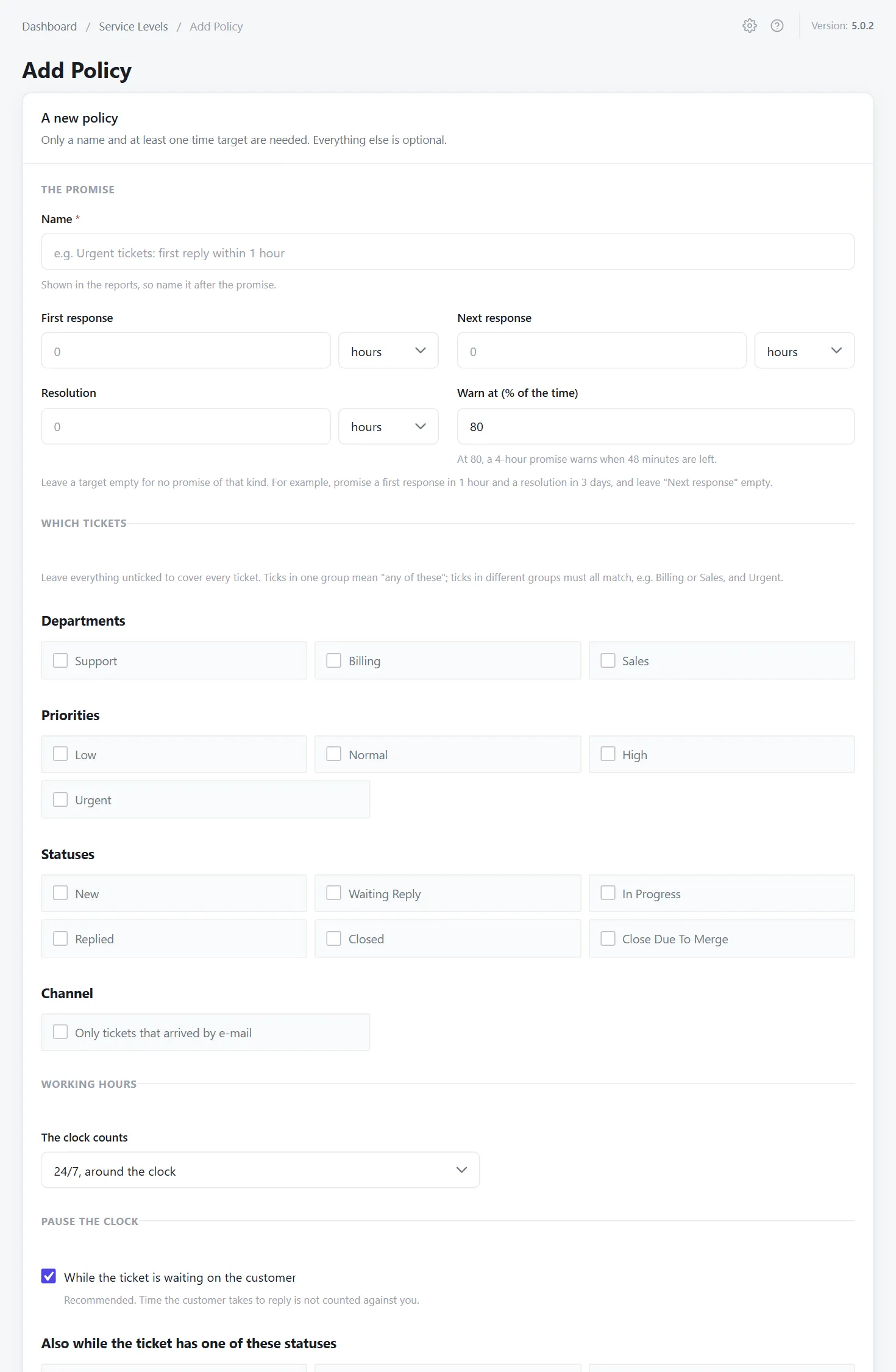
The promise
Section titled “The promise”| Field | What it does | Default |
|---|---|---|
| Name | What the reports call the policy, so name it after the promise. Up to 120 characters. | Required |
| First response | How long until somebody on your team answers at all. | Empty |
| Next response | Once a conversation is going: how long you take to answer each time the customer writes again. | Empty |
| Resolution | How long until the ticket is closed. | Empty |
| Warn at (% of the time) | When to warn that a promise is running out, as a percentage of its time. At 80, a 4-hour promise warns when 48 minutes are left. 1 to 99. | 80 |
Each target is a number (0 to 100000) and a unit: minutes, hours or days. Leave a target empty to make no promise of that kind. At least one must be set, or saving stops with “A policy has to promise something.”
Which tickets
Section titled “Which tickets”Leave everything unticked and the policy covers every ticket. Ticks in one group mean “any of these”; ticks in different groups must all match. Ticking Billing and Sales under Departments and Urgent under Priorities means “Billing or Sales, and Urgent”.
| Group | Matches on |
|---|---|
| Departments | The ticket’s department. |
| Priorities | The ticket’s priority. |
| Help topics | The ticket’s topic. |
| Statuses | The ticket’s status at the moment a clock would start. |
| Customer tiers | The tier the customer belongs to. Shown once you have created tiers (see below). |
| Channel | Only tickets that arrived by e-mail. |
Which policy wins
Section titled “Which policy wins”Policies are checked in Order, lowest number first. A ticket follows the first switched-on policy whose conditions it meets, and the rest are never asked. Put specific policies (Urgent, a VIP tier) above general ones (every ticket).
A ticket that matches no policy has no promise and no clocks. A ticket keeps the policy its clocks started under, even if you later change the policy’s conditions or the ticket’s details.
Working hours
Section titled “Working hours”The clock counts decides which minutes count towards a target:
| Option | Counts |
|---|---|
| 24/7, around the clock | Every minute. Holidays are ignored. (default) |
| Only our business hours (set below) | Only the hours you set in the week below, in the chosen time zone, skipping the days you are closed. |
| Only the assigned agent’s team hours | The working week of the assigned agent’s team (needs the Agents & Teams pack; team hours are set under Agents & Access › Teams). If the ticket has no agent, or the agent’s teams have no hours, the policy’s own week is used. |
With Only our business hours, three more things appear:
- Time zone: what the opening times mean. The site’s own uses WordPress’s time zone.
- The week: tick each day you are open and give its opening and closing times. Monday to Friday, 9 to 5 fills that in for you; Clear unticks every day. A day whose closing time is not after its opening time is dropped when you save.
- Days you are closed: one date per line as
2026-12-25, with an optional name after it (2026-12-25 Christmas Day). Lines that aren’t a date are ignored. A holiday is closed all day, whatever the week says.
If you choose business hours but tick no days, the policy counts around the clock rather than never coming due.
For example, a 4-hour target on a 9-to-5 week, for a ticket raised at 16:00 on a Friday, is due at 12:00 on Monday.
Pause the clock
Section titled “Pause the clock”| Field | What it does | Default |
|---|---|---|
| While the ticket is waiting on the customer | Meant to stop the clock while you wait for the customer. | Ticked |
| Also while the ticket has one of these statuses | The clock stops while the ticket has any ticked status, and starts again when it leaves it. The due time moves on by the paused working time. | None |
Escalations (optional)
Section titled “Escalations (optional)”What to do as time runs out, for example “at 150%, tell the manager”. Each level has an At (%), a Do this, a To whom, a Note and the promises it applies to. See Escalations for what each action does.
More options
Section titled “More options”| Field | What it does | Default |
|---|---|---|
| Included when SLAs are on | Yes, or No, keep it but do not use it to park a policy without deleting it. | Yes |
| Order | Where it sits in the checking order. Lower numbers are checked first. 0 to 9999. | The number of policies you already have |
| Description (for your team) | A note for whoever edits the policy next. | Empty |
Click Save policy. You go back to the list; open the policy again with Edit to see how it would have handled your recent tickets (see Testing a policy).
Withdraw policy (when editing) removes it. Its running clocks stop and are recorded as no longer applying; its past results stay in the reports under its name.
Customer tiers
Section titled “Customer tiers”A tier is the reason one customer gets four hours and another gets two. It promises nothing by itself: it is a group of customers that a policy can match on under Customer tiers.
Open Customer tiers (optional) on the Service Levels screen. There is always one empty A new tier box to fill in.

| Field | What it does |
|---|---|
| Name | The tier’s name, up to 60 characters. Clear it to remove the tier; policies that match on it then stop matching it. |
| Who is in it | One per line: an e-mail address for one person, or a domain for a whole company (@example.com or example.com). |
| And anybody with one of these roles | WordPress roles whose members are in the tier. Applies to customers who have an account. |
Click Save tiers. When a customer could be in more than one tier, the most specific answer wins, in this order: their own address, then the tier on their company record under Customers, then their domain, then their role.