

Background Work
Much of the help desk’s work happens with nobody waiting for it: e-mails, webhook deliveries, automation rules part way through a delay, service level clocks, digests, exports and clean-ups. If any of it stops, System Status → Background Work is where it shows.
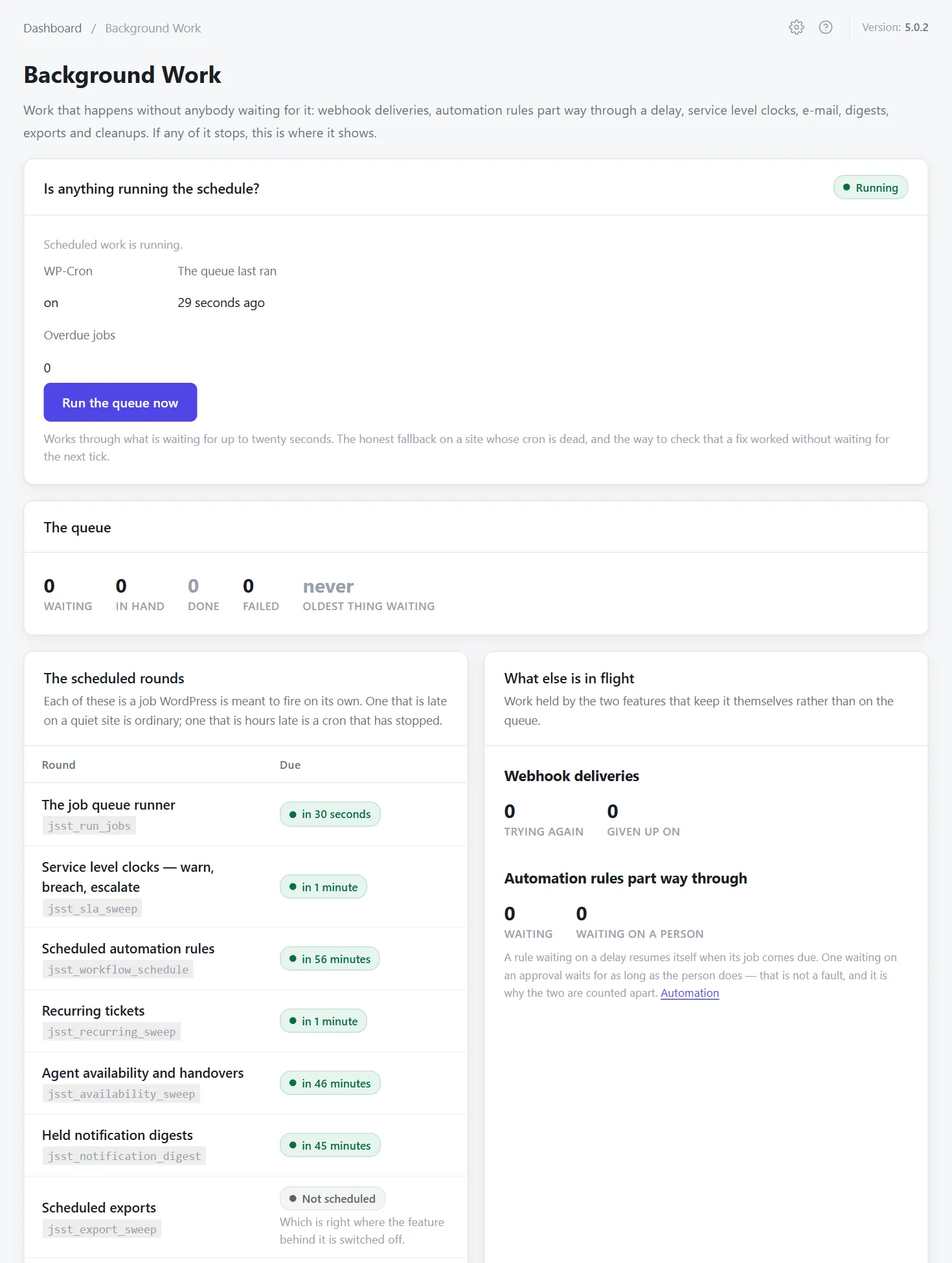
Is anything running the schedule?
Section titled “Is anything running the schedule?”WordPress only runs scheduled work when someone loads a page (WP-Cron). On a
quiet site that can mean hours of nothing, and if wp-config.php switches
WP-Cron off with nothing else calling it, nothing runs at all. Both look healthy
everywhere else in admin. This card tells you which.
| State | Means |
|---|---|
| Running | Nothing scheduled is more than 15 minutes overdue. |
| Running late | Something is more than 15 minutes overdue, but none by more than an hour. Normal on a quiet site. |
| Stopped | Something is more than an hour overdue. The card says why: either WP-Cron is switched off in wp-config.php and whatever should replace it isn’t calling, or the site isn’t getting the page loads WP-Cron needs. |
Under it:
| Item | Shows |
|---|---|
| WP-Cron | on, or switched off in wp-config.php. |
| The queue last ran | How long ago the job queue last worked. |
| Overdue jobs | How many of the scheduled rounds (below) are more than 15 minutes overdue. |
If the state isn’t Running, or WP-Cron is off, the card gives the address
that something outside WordPress should call every five minutes (your site’s
wp-cron.php). Set up a cron job on your server, or a web cron service, to call
it. See Scheduled jobs.
Run the queue now works through whatever is waiting for up to twenty seconds and tells you how many jobs it did. Use it when cron has stopped, or to check that a fix worked without waiting.
The queue
Section titled “The queue”The job queue holds work handed off to run later. If the queue’s table is missing, the card says so: that work is then done straight away instead, which is slower but loses nothing.
| Figure | Means |
|---|---|
| Waiting | Jobs not started yet. |
| In hand | Jobs being worked on now. |
| Done | Finished jobs. They are kept for seven days, then cleared. |
| Failed | Jobs that failed three times and were given up. They stay until you act. |
| Oldest thing waiting | How long the oldest waiting job has waited. |
Stuck appears when there is work waiting and the queue hasn’t run for more than 15 minutes. Work waiting is normal; work waiting while nothing picks it up is not. Check the schedule card above.
By what produced it
Section titled “By what produced it”The same counts split by group, so you can see which feature is backed up:
for example webhook, workflow, export, retention, inbox, chat or
satisfaction.
A group with failures has two buttons:
- Try them all again puts every failed job in that group back on the queue, with its attempts reset.
- Throw them away deletes that group’s failed jobs, after you confirm. Do this only once you know why they failed: they are the record of what went wrong.
In somebody’s hands right now
Section titled “In somebody’s hands right now”Jobs being worked on now, with how long each has been Held for. A job held for more than five minutes is marked Abandoned: the process working on it has gone. The queue releases these itself on its next run; Let go of it does it now.
What failed
Section titled “What failed”The most recent failed jobs, with What went wrong and how many Tries. Try it again puts one job back on the queue with its attempts reset, so after you fix the cause it gets a clean run.
Failed jobs are never thrown away on a timer. A job that is given up on is also recorded in the help desk’s error log.
A failed job is retried automatically before it is given up: after the first failure it waits a minute, after the second four minutes, and the third failure is final.
The scheduled rounds
Section titled “The scheduled rounds”Each round is a task WordPress should start on its own. The table shows each one’s Due time, and marks it Late when it is more than 15 minutes overdue.
| Round | Belongs to |
|---|---|
| The job queue runner | The free plugin. Runs every minute. |
| Service level clocks — warn, breach, escalate | Service Levels & Automation pack. |
| Scheduled automation rules | Service Levels & Automation pack. |
| Recurring tickets | Service Levels & Automation pack. |
| Agent availability and handovers | Agents & Teams pack. |
| Held notification digests | The free plugin: agents’ notifications held back and sent as an hourly or daily digest. |
| Scheduled exports | Scheduled exports; only while an export is saved. |
| Retention and archiving | Retention. |
| Satisfaction surveys and reminders | Customer Experience pack. |
Not scheduled is normal where the feature behind a round is switched off or not installed.
The analytics digest’s daily check isn’t one of the rounds listed here.
What else is in flight
Section titled “What else is in flight”Two features keep their own lists rather than using the queue, and this card summarises them.
- Webhook deliveries (Integrations pack): how many are Trying again and how many were Given up on. Open them on the Webhooks screen, where each can be sent again.
- Automation rules part way through (Service Levels & Automation pack): how many are Waiting on a delay and how many are Waiting on a person. A rule waiting on a delay resumes on its own; one waiting on an approval waits as long as the person does. Neither is a fault.