

Content Review
Help Center → Content Review keeps your knowledge base accurate. The AI answers customers from your articles and will quote any published one, so this is where you make sure what it quotes has been checked by a person.
Only administrators can open it. It has three tabs: To do, Reports and Settings. The To do tab shows a count of articles waiting for review plus articles overdue a re-read.
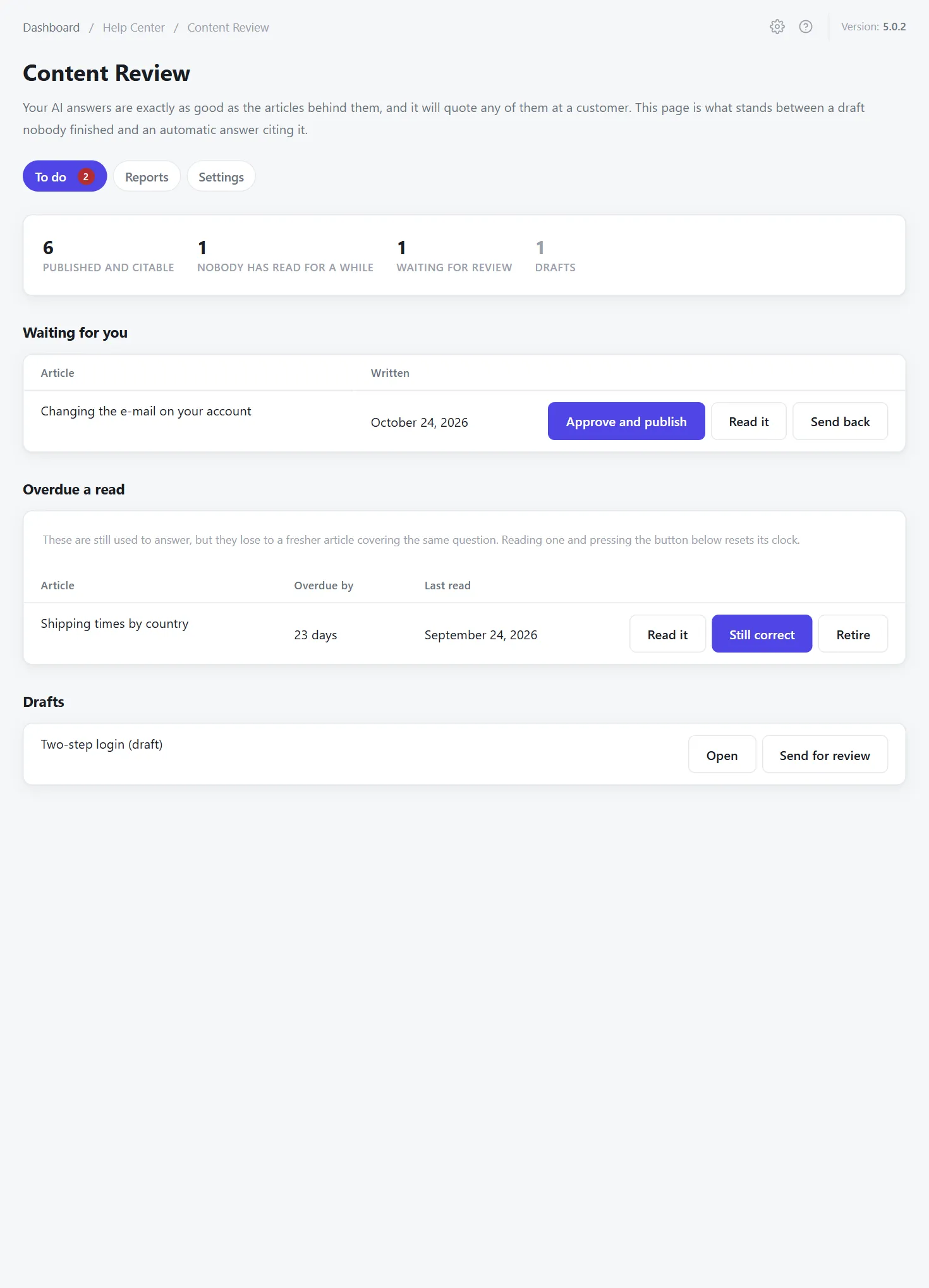
The figures
Section titled “The figures”| Figure | What it counts |
|---|---|
| Published and citable | Published articles. |
| Nobody has read for a while | Published articles past their re-read date. |
| Waiting for review | Articles at the Waiting for review stage. |
| Drafts | Articles at the Draft stage. |
Waiting for you
Section titled “Waiting for you”Shown when any article is waiting for review: up to 25, newest first, with the date each was written.
| Button | What it does |
|---|---|
| Approve and publish | Publishes the article. It goes live in the portal, can be suggested and quoted by the AI, and its re-read clock starts from today. |
| Read it | Opens the article’s form. |
| Send back | Returns it to Draft. |
Overdue a read
Section titled “Overdue a read”Published articles past their re-read date, the most overdue first (up to 40). The note above the list tells you what is happening to them under your current rule.
| Column or button | What it does |
|---|---|
| Overdue by | How many days past the re-read date. |
| Last read | When someone last published the article or marked it Still correct. never means nobody has, and the clock is counted from when the article was written. |
| Read it | Opens the article’s form. |
| Still correct | Records that you’ve read it and it’s right. The clock starts again from today. |
| Retire | Moves the article to Retired: off the portal and never used to answer anything. |
If nothing is overdue, the list says Nothing overdue.
Drafts
Section titled “Drafts”Shown when there are drafts: up to 25, newest first.
| Button | What it does |
|---|---|
| Open | Opens the article’s form. |
| Send for review | Moves it to Waiting for review, so it appears under Waiting for you. |
Reminder e-mails
Section titled “Reminder e-mails”Once a week, each article owner whose articles are overdue gets one e-mail listing up to 20 of them, with how many days overdue each is and a link to this screen. Nobody is e-mailed when nothing is overdue.
An article’s owner is the agent who wrote it. Articles written by an administrator without an agent record have no owner, so no reminder goes out for them; check this screen yourself.
Reports
Section titled “Reports”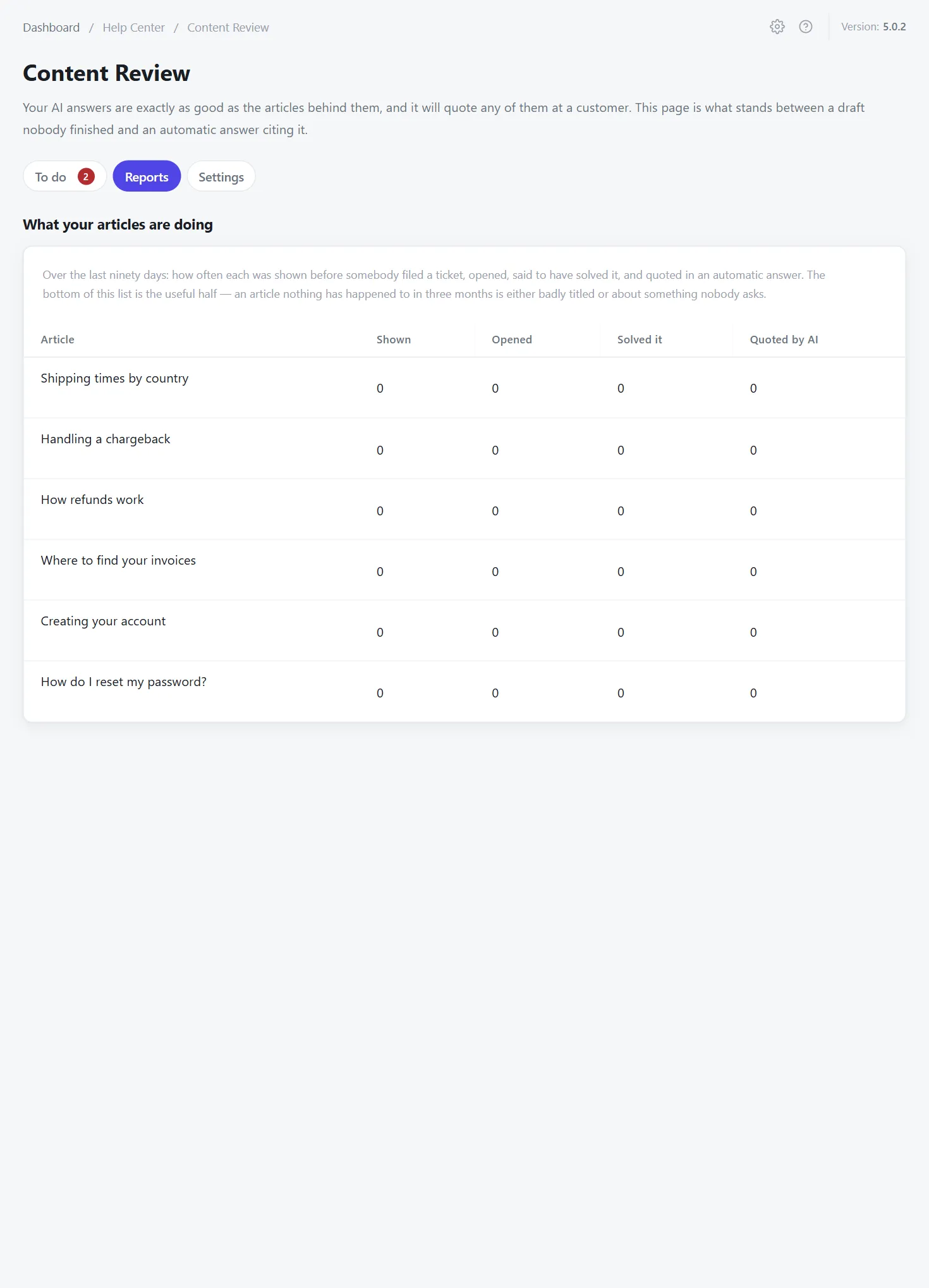
What your articles are doing
Section titled “What your articles are doing”For up to 30 published articles, over the last 90 days:
| Column | What it counts |
|---|---|
| Shown | How often the article was suggested on the ticket form. |
| Opened | How often a customer opened it from a suggestion. |
| Solved it | How often a customer clicked Yes, this solved my issue! while it was showing. |
| Quoted by AI | How often an automatic answer was based on it. |
The busiest articles are at the top. Rows where nothing happened are at the bottom, and they’re the useful half: an article nobody has seen, opened or quoted in three months is either badly titled or about something nobody asks.
Shown, Opened and Solved it are recorded by the AI Agent pack. Without it, they stay at zero.
Two articles, one address
Section titled “Two articles, one address”Shown when more than one article has the same web address (only possible through a CSV import). Each address is listed with how many articles claim it. Nothing is renamed for you; edit the import file and import again.
If there’s nothing to report, the tab says Nothing to report yet.
Settings
Section titled “Settings”Bringing articles in
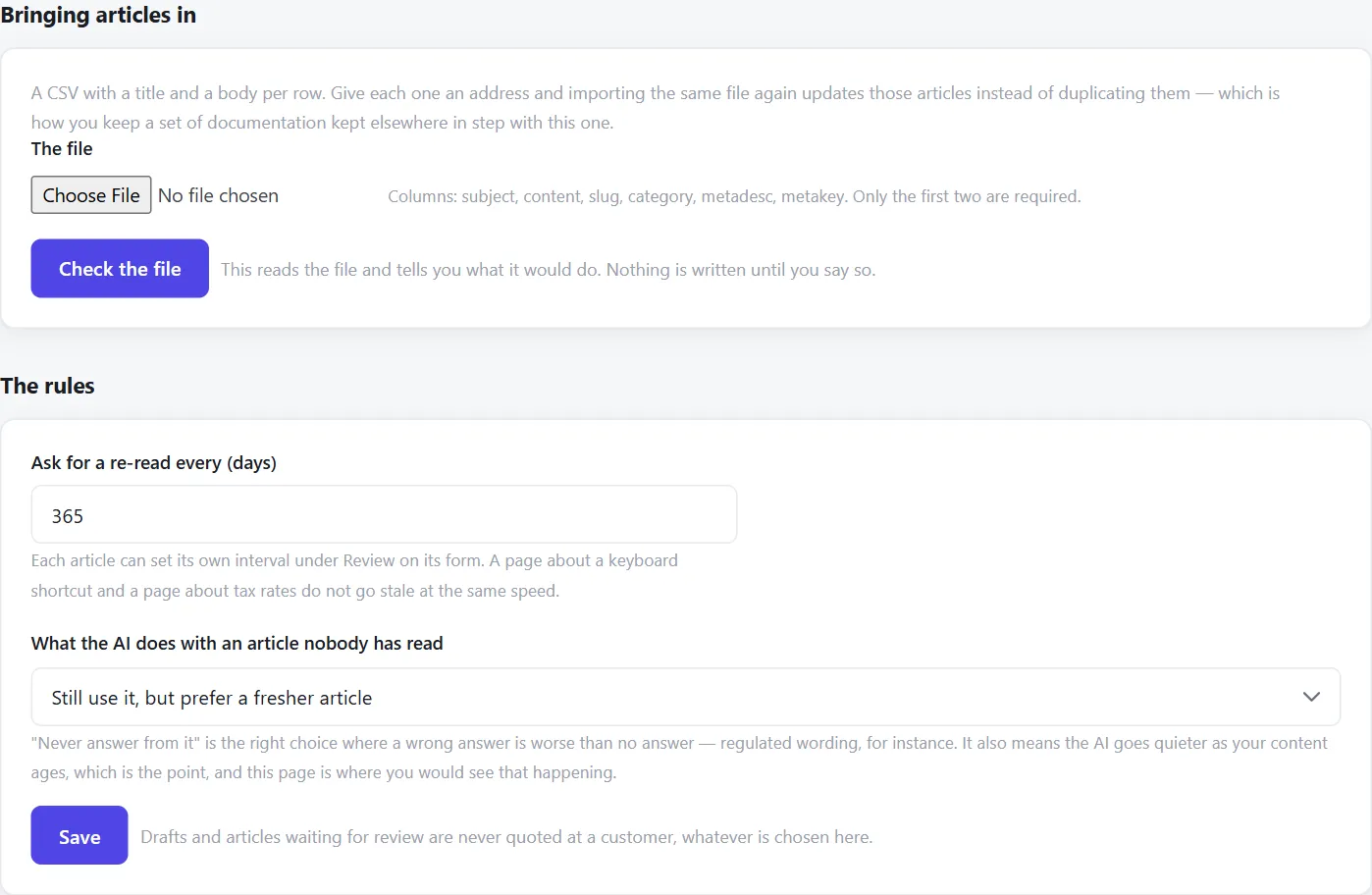
Section titled “Bringing articles in”Import articles from a CSV file. It takes two steps, and nothing is written until the second.
-
Under The file, choose your CSV file and click Check the file.
-
Read what the file would do. The screen says how many articles it would add and how many it would update, lists any lines that will be skipped and why, and shows the first 25 rows with what will happen to each: New, as a draft or Replaces an existing article.
-
Click Import them, or Cancel. A check is kept for an hour; after that, Import them says “That check has expired. Upload the file again.”
-
Find the new articles under Drafts on the To do tab, read them and publish them.
The CSV file
Section titled “The CSV file”The first row must be a header row naming the columns. Columns can be in any order, and the names are matched ignoring case, spaces and punctuation.
| Column | What it holds | Required |
|---|---|---|
subject |
The article’s title. | Yes |
content |
The article’s body. HTML is allowed and is cleaned the same way as a post. | Yes |
slug |
The article’s address, such as export-tickets. If empty, one is made from the title. |
No |
category |
The name of an existing category, exactly as it is spelt. | No |
metadesc |
Meta Description. | No |
metakey |
Meta Keywords. | No |
For example:
subject,content,slug,category,metadesc,metakey"How do I export my tickets?","<p>Open Tickets, choose Export.</p>","export-tickets","Getting started","Exporting your ticket list","export,csv"What happens to each row:
- A row whose address matches an existing article updates that article: its title, body and meta fields are replaced. Its stage and category are left as they were, and a copy of what it said before is kept. Importing the same file again therefore updates rather than duplicates, which is how you keep articles kept elsewhere in step.
- Any other row adds a new article as a Draft, visible to everyone once published.
- A row with no title or no body is skipped, and listed (“Line 4 has no body.”).
- A file stops at 2,000 rows. Split bigger files.
The rules
Section titled “The rules”| Setting | What it does | Default |
|---|---|---|
| Ask for a re-read every (days) | How long an article can go without a re-read, unless the article sets its own period. Between 7 and 3650. | 365 |
| What the AI does with an article nobody has read | See below. | Still use it, but prefer a fresher article |
The choices for What the AI does with an article nobody has read:
| Choice | What happens to an overdue article |
|---|---|
| Still use it, but prefer a fresher article | It’s still used to answer, but it loses to a fresher article that covers the same question. |
| Never answer from it | It isn’t used to answer anything until someone marks it Still correct. Right where a wrong answer is worse than no answer, such as regulated wording. The AI goes quieter as your content ages, and this screen is where you’d see that. |
| Nothing — treat every published article the same | Staleness is ignored. |
Click Save. Whatever you choose, drafts and articles waiting for review are never quoted at a customer. These rules only affect the AI and suggestions: overdue articles stay visible in the portal.