

Outgoing webhooks
An outgoing webhook calls an address of yours whenever a chosen event happens, such as a ticket being raised or closed. Use it to feed Zapier, Make, a CRM or your own code. Each call is signed, so the receiver can prove it came from your site and wasn’t altered.
API & Webhooks → Webhooks.
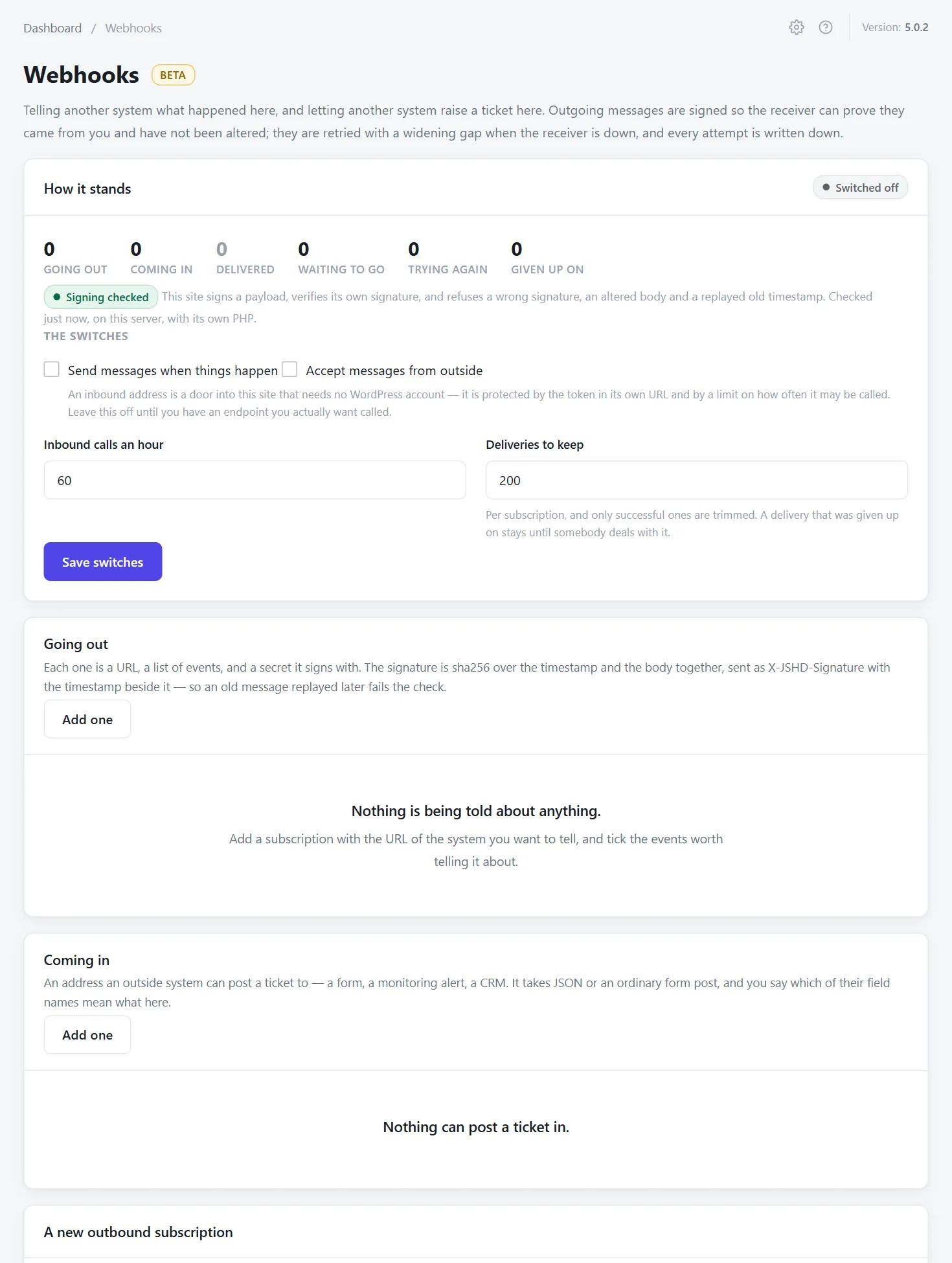
Switching it on
Section titled “Switching it on”How it stands counts subscriptions going out and coming in, and deliveries Delivered, Waiting to go, Trying again and Given up on. Each time the screen opens, the site also checks its own signing; Signing checked means it signs correctly and refuses a wrong signature, an altered body and an old timestamp. If you ever see Signing is wrong, don’t rely on deliveries until it is looked at.
| Setting | Default | What it does |
|---|---|---|
| Send messages when things happen | Off | Nothing is sent until this is ticked. |
| Accept messages from outside | Off | Opens the incoming addresses. See Incoming webhooks. |
| Inbound calls an hour | 60 | How often each incoming address may be called. 1 to 10000. |
| Deliveries to keep | 200 | Per subscription. Only successful deliveries are trimmed; ones that were given up on stay until somebody deals with them. 20 to 10000. |
Click Save switches.
Adding a subscription
Section titled “Adding a subscription”-
Under Going out, click Add one. The form below is headed A new outbound subscription.
-
Fill in What it is:
Field What it does Name Shown in the delivery log, so name it after the system at the other end. Required. Address to call Must start with https://. An address on your own site is refused, because it would make a loop.In use Yes, or No — keep it, but do not use it to pause it. -
Under Tell it about, tick the events to send. At least one is required.
-
Optional: Extra headers, one a line as
Name: value, for a receiver that wants a tenant id or a routing key. You can’t override the signature, timestamp, delivery, event or content-type headers. -
Click Save. The secret the deliveries are signed with is created now.
To change a subscription, click Edit beside it. Its secret shows the start of the secret; tick Give it a new secret, and stop the old one verifying and save to replace it. Delete removes the subscription and its delivery history.
There is no Test button. To see a delivery, make the event happen, for example by raising a test ticket.
Events
Section titled “Events”These are the events you can choose. Each delivery’s payload always carries
the fields marked as always sent, and may carry the others.
| Event | On screen | Always sent | May also carry |
|---|---|---|---|
ticket.created |
A ticket was raised | ticket_id |
ticketid, subject, departmentid, priorityid, helptopicid, productid, uid, email, source |
consent.recorded |
Somebody answered a marketing consent question | consent_id, email, granted |
name, source, statement |
ticket.reply_added |
Somebody answered | ticket_id, reply_id |
author_kind, author_uid, is_customer, attachments, source |
ticket.note_added |
An internal note was written | ticket_id, note_id |
author_uid, restricted |
ticket.assignment_changed |
A ticket changed hands | ticket_id, staffid |
previous_staffid, reason, automatic |
ticket.status_changed |
A ticket changed status | ticket_id, status |
previous_status, reason |
ticket.priority_changed |
A ticket changed priority | ticket_id, priorityid |
previous_priorityid, reason |
ticket.department_changed |
A ticket moved department | ticket_id, departmentid |
previous_departmentid, reason |
ticket.closed |
A ticket was closed by an automation rule (see the note below) | ticket_id |
closed_by, reason, automatic |
ticket.reopened |
A ticket was reopened | ticket_id |
reason, reopened_by |
ticket.merged |
Tickets were merged | ticket_id, merged_into |
note |
ticket.deleted |
A ticket was deleted | ticket_id |
ticketid, subject, uid |
sla.warning |
A ticket is running out of time | ticket_id, due |
policy, target, minutes_left |
sla.breached |
A ticket missed its target | ticket_id, due |
policy, target, minutes_over |
feedback.received |
A customer rated the answer | ticket_id, rating |
comment, uid |
ai.answer_proposed |
The AI drafted an answer | ticket_id |
provider, model, confidence, citations, tokens |
ai.answer_sent |
An AI answer went to the customer | ticket_id |
reply_id, provider, model, edited_by_agent, confidence |
ticket_id is the ticket’s number in the database; ticketid is the ticket ID
customers see. Some events only happen with other packs, for example the SLA
events with Service Levels & Automation.
What a delivery looks like
Section titled “What a delivery looks like”Each delivery is a POST with a JSON body, the envelope:
{ "event": "ticket.status_changed", "version": 1, "id": "6f1c2b0e-7a4d-4c1e-9d55-0b2f3c8e1a7d", "occurred": "2026-10-21 14:03:00", "site": 1, "source": "admin", "actor": { "kind": "agent", "wpuid": 7, "uid": 5, "staffid": 2, "display": "Jordan Lee" }, "payload": { "ticket_id": 4, "status": 3, "previous_status": 1 }}| Field | Meaning |
|---|---|
event |
The event name. |
version |
The version of that event’s payload. |
id |
A unique id for this event. Use it to ignore duplicates. |
occurred |
When it happened, in UTC. |
site |
The site’s number (1 unless you run a multisite network). |
source |
Where it came from: admin, frontend, ajax, rest, cron, cli or automation. |
actor |
Who did it. kind is admin, agent, customer, guest or system. |
payload |
The event’s own fields, from the table above. |
The envelope deliberately doesn’t contain the whole ticket. If you need more,
fetch it with the REST API using payload.ticket_id.
These headers come with it:
| Header | Contains |
|---|---|
Content-Type |
application/json; charset=utf-8 |
User-Agent |
JS-Help-Desk/ and the plugin version |
X-JSHD-Event |
The event name. |
X-JSHD-Delivery |
The delivery’s number in the log. |
X-JSHD-Timestamp |
When it was sent, in Unix seconds. |
X-JSHD-Signature |
sha256= followed by the signature. |
Checking the signature
Section titled “Checking the signature”The signature is an HMAC-SHA256, in lowercase hex, of the timestamp, a full stop and the exact body, keyed with the subscription’s secret. Because the timestamp is signed too, an old delivery replayed later fails. The help desk’s own check accepts a timestamp up to 300 seconds either side of now; do the same.
<?php$secret    = 'whsec_…';                       // the subscription's secret$body      = file_get_contents('php://input'); // the raw body, unchanged$timestamp = $_SERVER['HTTP_X_JSHD_TIMESTAMP'] ?? '';$given     = $_SERVER['HTTP_X_JSHD_SIGNATURE'] ?? '';
if (abs(time() - (int) $timestamp) > 300) {    http_response_code(401);    exit('Too old');}
$expected = hash_hmac('sha256', $timestamp . '.' . $body, $secret);$given    = preg_replace('/^sha256=/', '', $given);
if (!hash_equals($expected, $given)) {   // constant-time comparison    http_response_code(401);    exit('Bad signature');}
$event = json_decode($body, true);// … act on $event['event'] and $event['payload'] …http_response_code(200);
Sign the raw body exactly as it arrived; decoding and re-encoding the JSON
changes the bytes. Always compare with a constant-time function such as
hash_equals.
Retries and delivery states
Section titled “Retries and delivery states”The help desk waits up to 10 seconds for an answer and doesn’t follow redirects.
| Answer | What happens |
|---|---|
| Any 2xx | Delivered. |
| 410 Gone | Given up at once, and the subscription is switched off (In use: No). |
| Anything else, or no answer | Trying again: queued again after 1, 2, 4, 8 and 16 minutes. |
| Sixth failure | Given up. |
Deliveries go out through the help desk’s job queue, so the real gaps depend on how often the queue runs; see Scheduled jobs.
What has been sent
Section titled “What has been sent”The bottom of the screen lists the 30 latest deliveries, newest first (only those for one subscription while you are editing it): the event, the ticket, the state with answered 200 in 85ms, What it said (the start of the receiver’s answer), how many Tries, and When.
Send it again, beside a delivery that is Trying again or Given up, puts it back at the front of the queue with its tries reset. It goes out the next time the job queue runs.
Calls made by an automation rule’s webhook action (Service Levels &
Automation) appear in the same log as workflow.webhook.