

REST API
The REST API lets other software read and work tickets: your own portal, a CRM, a monitoring system, a script. Every call is made as a real account on your site, and is allowed exactly what that account may do at the desk. There is no separate set of API permissions.
This page is for developers. The operations themselves are listed on REST API reference.
The API screen
Section titled “The API screen”API & Webhooks → API.
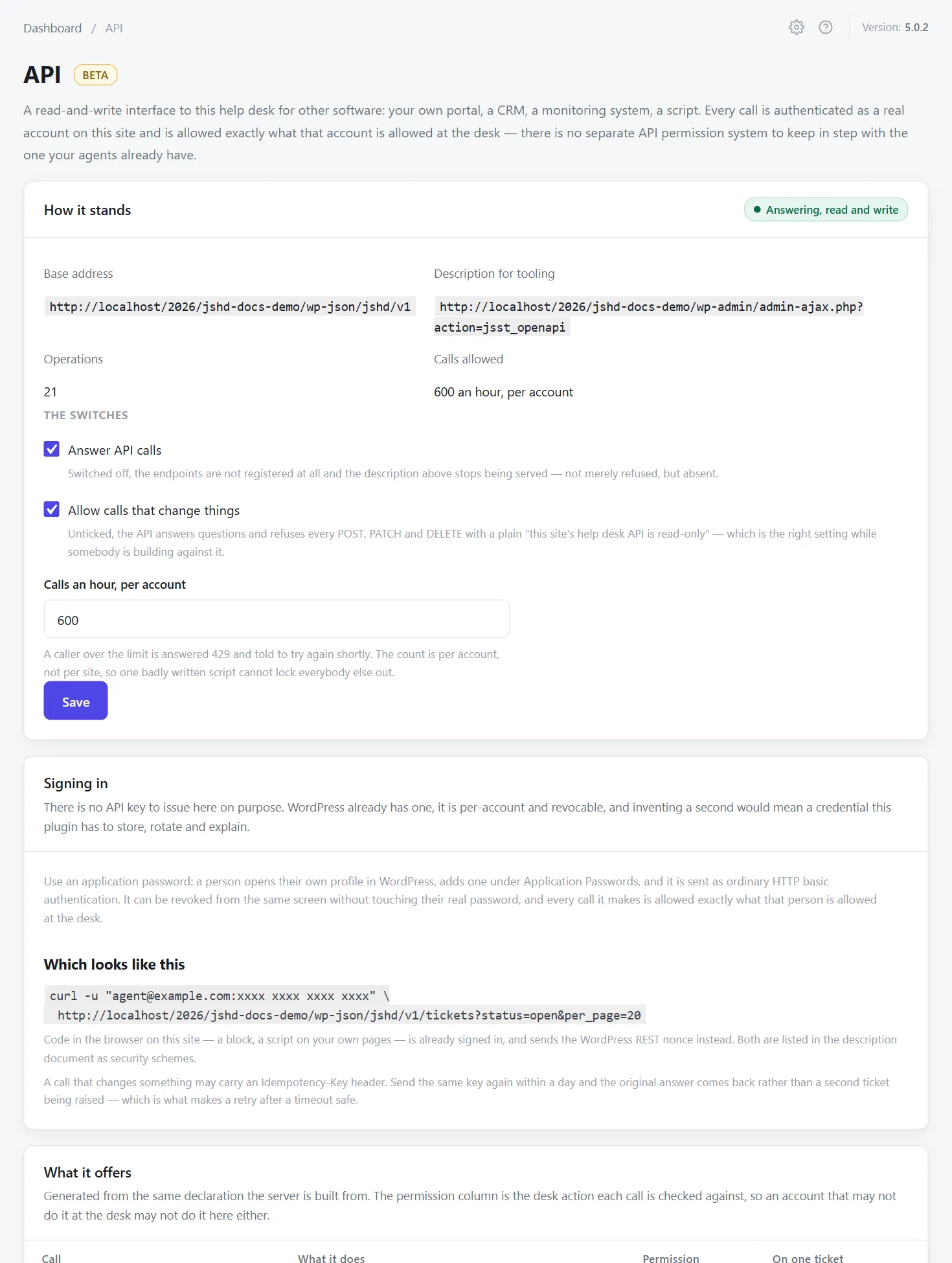
How it stands shows whether the API is answering, and gives you:
- Base address: where every call starts, for example
https://example.com/wp-json/jshd/v1. - Description for tooling: an OpenAPI 3.1 document describing every operation, for tools such as code generators. It is served to anyone, without signing in, but only while the API is on.
- Operations: how many there are.
- Calls allowed: the rate limit.
If an operation ever names no permission (other than /me), a Look at this
warning lists it.
The switches
Section titled “The switches”| Setting | Default | What it does |
|---|---|---|
| Answer API calls | On | Off removes the endpoints altogether, and the description document stops being served. |
| Allow calls that change things | On | Off makes the API read-only: every POST, PATCH and DELETE is refused with “This site’s help desk API is read-only.” Useful while someone is building against your site. |
| Calls an hour, per account | 600 | How many calls one account may make in an hour. Between 10 and 100000. |
Click Save. Saving doesn’t affect anyone’s Application Passwords; it only changes what the API answers.
Signing in
Section titled “Signing in”The API has no keys of its own. Callers sign in with a WordPress Application Password, sent as ordinary HTTP basic authentication. Each password belongs to one WordPress user, can be revoked on its own, and never reveals the user’s real password.
-
Decide which account the integration should act as. It can do exactly what that person can do at the desk, so for an integration that only reads tickets, use an account that can only read tickets.
-
Sign in to WordPress as that person (or edit their user as an administrator) and open Users → Profile.
-
Scroll to Application Passwords. Type a name that says what it is for, such as
CRM sync, and click Add New Application Password. -
Copy the password WordPress shows. It is shown only once.
-
Send it with every call, with the WordPress username:
Terminal window curl -u "jordan:abcd EFGH ijkl MNOP qrst UVWX" \"https://example.com/wp-json/jshd/v1/me" -
Check the answer.
/mesays who you are signed in as and lists every desk action the account may perform, inmay.
To revoke access, click Revoke beside the password on the same profile screen.
Permissions
Section titled “Permissions”Each operation is checked against one desk action, shown in the Permission
column of What it offers: for example queue.view to list tickets,
ticket.reply to answer one. Operations marked and on that ticket in
particular are checked against that one ticket, so department limits and
per-agent visibility apply exactly as they do on the ticket screen. Customers
can use the API too, and see only their own tickets.
What each account may do is set under Roles and access and, with the Agents & Teams pack, per agent.
Paging and filtering
Section titled “Paging and filtering”Lists come back a page at a time. Send page (from 1) and per_page (20
unless you say otherwise, at most 100). The total number of matches is in the
X-WP-Total response header; the ticket list also sends the number of pages
in X-WP-TotalPages.
curl -u "jordan:abcd EFGH ijkl MNOP qrst UVWX" -i \ "https://example.com/wp-json/jshd/v1/tickets?departmentid=2&per_page=50&page=2"Dates go out in ISO 8601, for example 2026-10-21T14:03:00+00:00. Dates you
send (since, from, to) may be ISO 8601 or 2026-10-21 14:03:00.
Retrying safely: Idempotency-Key
Section titled “Retrying safely: Idempotency-Key”A POST that raises a ticket or adds a reply may carry an Idempotency-Key
header with any unique value you choose. If the same account sends the same key
to the same address again within 24 hours, the help desk doesn’t do the work a
second time: it returns the first answer, with the header
Idempotent-Replay: true and status 200. This makes it safe to retry after a
timeout.
curl -u "jordan:abcd EFGH ijkl MNOP qrst UVWX" \ -H "Content-Type: application/json" \ -H "Idempotency-Key: crm-case-88412" \ -d '{"subject":"Cannot log in","message":"The reset link has expired.","email":"maria@example.com","departmentid":1}' \ "https://example.com/wp-json/jshd/v1/tickets"Writing an internal note (POST /tickets/{id}/notes) does not honour the
header.
Rate limit
Section titled “Rate limit”Each account may make Calls an hour, per account calls per clock hour. Over that, calls are refused with status 429 and “Too many requests. Try again shortly.” until the next hour starts. The count is per account, so one busy script can’t lock everyone else out.
Errors
Section titled “Errors”Errors come back as JSON in WordPress’s usual shape, with a code, a message
and data.status:
{ "code": "jshd_forbidden", "message": "Your account is not allowed to ticket.delete.", "data": { "status": 403, "action": "ticket.delete" } }| Status | Code | Means |
|---|---|---|
| 401 | jshd_not_authenticated |
No valid Application Password or signed-in session. |
| 403 | jshd_read_only |
Allow calls that change things is off. |
| 403 | jshd_forbidden |
The account may not perform this action. data.action names it. |
| 403 | jshd_nothing_changed |
A PATCH where every change was refused. data.refused says why for each field. |
| 404 | jshd_not_found |
No ticket with that id. |
| 404 | jshd_unknown_route |
The address isn’t part of this API. |
| 404 | jshd_no_sla |
The SLA report was asked for without the Service Levels & Automation pack. |
| 429 | jshd_rate_limited |
Over the hourly limit. |
When the help desk itself refuses something (for example, replying to a locked ticket), its own error code is passed through, with 403 for refusals, 404 for things that don’t exist, 500 for failures to save and 400 otherwise.
When Answer API calls is off, the endpoints don’t exist, so WordPress answers 404.