

Notes and mentions
An internal note is for your team: what you’ve tried, who you asked, why the ticket moved. The customer never sees it, isn’t e-mailed about it, and it never appears in their portal. Both agent roles can write notes.
Writing a note
Section titled “Writing a note”On the WordPress desk, switch the reply box to Internal note, or press N.
In the portal, click Post New Internal Note.
| Field | What it does |
|---|---|
| Note Title | A short heading. |
| Internal Note | The note itself. |
| Who can read it | Leave it unticked for a note every agent on the ticket can read. See below. WordPress desk only. |
| Close On Reply | Closes the ticket as the note is saved, if you are allowed to close tickets. |
| Attachments | One file. With the Agents & Teams pack, you need the Attachment permission. |
Click Post Internal Note. Notes are listed in their own Internal Notes section above the conversation, and can’t be edited or deleted afterwards. More on notes in Replies and internal notes.
Asking someone by name
Section titled “Asking someone by name”With the Agents & Teams pack, write @ followed by a colleague’s name
anywhere in a note: @nina, can you check the VAT number on this?
- Their WordPress username or their display name both work, with or without
the space:
@nina,@Nina Pateland@ninapatelall find Nina Patel. - Capitals don’t matter.
- Only agents on the Agents list who are switched on can be named.
- Naming yourself does nothing.
The person you name:
- gets a You were asked by name notification (see Notifications),
- sees the note under Where you were named on their Home,
- starts following the ticket, so they hear what happens next.
Mentions work in notes written in either desk. A mention counts as unseen on Home until the person opens the ticket on the WordPress desk.
The handover summary on the ticket counts questions asked by name that nobody has looked at yet (see Working with colleagues).
Notes only some people can read
Section titled “Notes only some people can read”Sometimes a note isn’t for everybody: a customer’s complaint about a colleague, or a question for your manager. On the WordPress desk, under Who can read it:
- Tick Only the people I name below. The list of agents underneath becomes available; until then it is greyed out.
- Tick each colleague who should read it.
- Post the note as usual.
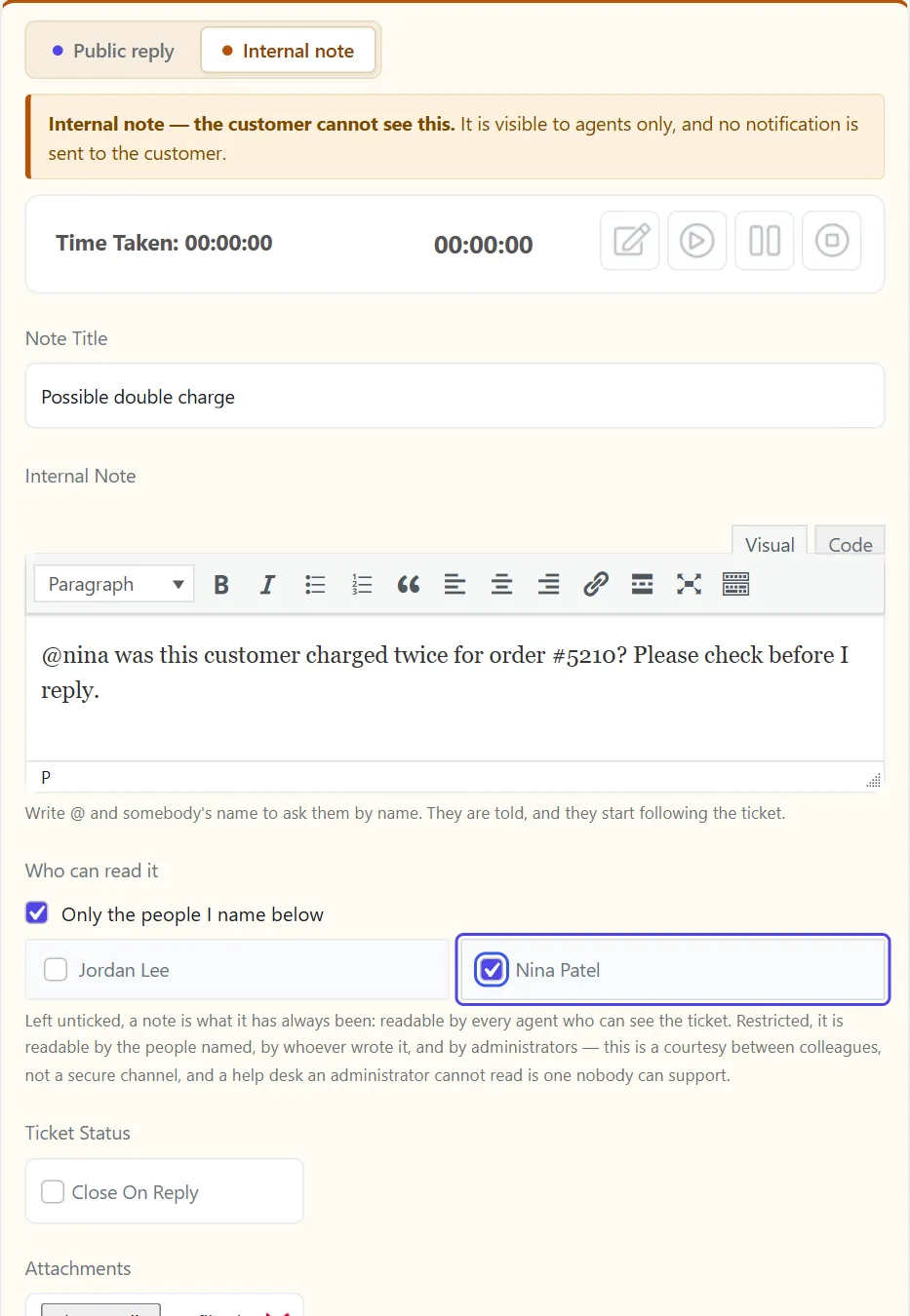
A restricted note can be read by the people you ticked, by you, and by administrators. Every other agent who can see the ticket doesn’t see the note.
If there are no other agents, the form says so, and a restricted note is readable only by you and administrators.
Ticking a name in this list doesn’t notify that person. To ask them something,
name them with @ in the note as well. The reverse matters too: if you restrict
a note, tick everyone you @mention in it, or they are told about a note they
can’t open.