

Unanswered Questions
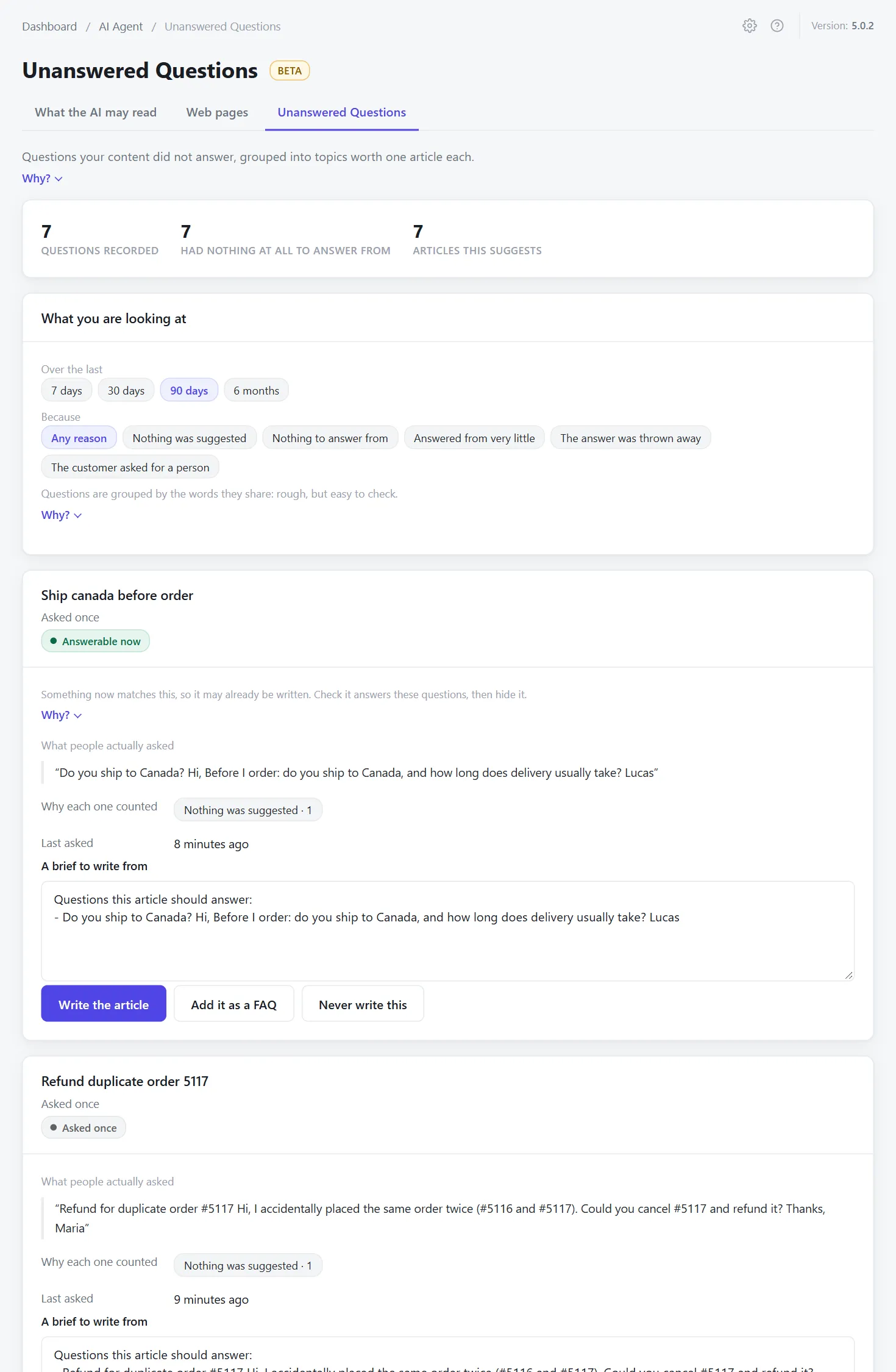
AI Agent → Knowledge Sources → Unanswered Questions lists the questions your content did not answer, grouped into topics worth one article each. Everything on it was asked by a real person. It fills itself as customers use the site: there is nothing to switch on.
Use it as your writing list. An AI answers exactly as well as the content behind it, and this is where the missing content shows up.
What counts as unanswered
Section titled “What counts as unanswered”A question is recorded for one of five reasons:
| Reason | What happened |
|---|---|
| Nothing was suggested | Somebody typed this into the ticket form, or searched the knowledge base in the portal, and found nothing. Also recorded when a customer submits a ticket and the same search finds nothing for its subject and message. Tickets an administrator or agent opens for somebody else are not counted. |
| Nothing to answer from | The AI looked for something to base an answer on, found nothing, and never asked the model. |
| Answered from very little | An answer was written, but it rested on so little of your content that it was held for a person. |
| The answer was thrown away | A person read what the AI proposed and rejected or withdrew it. |
| The customer asked for a person | They read an automatic answer and pressed the button asking for a human. |
The first two mean you have nothing on the subject. The last three mean you have something, and it is not good enough. Only the first reason can happen without the AI Agent pack.
The question is stored in the customer’s own words, after the strictest redaction: e-mail addresses, phone numbers, card numbers and long digit runs are removed whatever your redaction setting is. It is cut to 500 characters, and the same question typed twice within a minute counts once.
Some things are not recorded at all:
- a reaction with nothing to write an article about, such as “ok”, “that didn’t help” or a bare link;
- the same words typed twice in a row, which count as one question;
- a question that is a near copy of one recorded in the last 30 days (one contains the other), whatever reason either was recorded for. A ticket the form recorded and the AI then recorded again is listed once.
Links, numbers such as years and order numbers, and short words are ignored when questions are grouped into topics. Questions are kept for 180 days.
The counts
Section titled “The counts”At the top:
| Count | What it is |
|---|---|
| Questions recorded | Every question recorded in the period that a topic can be made of. The counts and the groups below use the same rule, so they agree. |
| Had nothing at all to answer from | Those recorded for the first two reasons. |
| Articles this suggests | How many groups are listed. |
| Hidden by hand | Groups you have hidden. Shown only when there are some. |
Narrowing the list
Section titled “Narrowing the list”What you are looking at has two rows of filters:
- Over the last: 7 days, 30 days, 90 days (default) or 6 months.
- Because: Any reason (default) or one of the five reasons above.
Questions are grouped by the significant words they share. It is rough on purpose: you can read two questions in a group and tell at once whether they belong together. The list is sorted by how often each topic was asked and shows the top 20 groups.
Each group
Section titled “Each group”Each group is a card, titled with the words its questions share, and marked with one of these:
| Mark | Meaning |
|---|---|
| Nothing to answer from | Most of its questions found nothing. Write something new. |
| Answered badly | Most of its questions were answered, poorly. Improve what exists. |
| Answerable now | A search finds something for it now, so it may already be written. Check it answers these questions, then hide it. |
A group only one person has asked about so far has no mark; the line under its title says Asked once.
Only the first eight groups are checked against a real search for Answerable now; the rest say “Not checked against retrieval”.
The card shows:
- how many times it was asked, and in how many different wordings;
- What people actually asked: up to eight of the questions, in their words;
- Why each one counted: the reasons, with a count for each;
- On these tickets: links to the tickets the questions came from;
- Last asked;
- A brief to write from: the questions as a list, plus the ticket numbers, ready to copy. Click in the box to select it.
Turning a group into content
Section titled “Turning a group into content”- Read What people actually asked and check the questions belong together.
- Click Write the article. The Add Article form opens with the group’s title filled in as the subject. If you would rather write a short answer, click Add it as a FAQ.
- Write the article, using the brief as your checklist, and publish it.
- Once the article is published and approved for the AI, the group shows Answerable now. Check it, then click Never write this to hide it.
Write the article needs the Knowledge Base, and Add it as a FAQ needs FAQs, both from the Knowledge & Self-Service pack. Without either, the brief is still there to use anywhere.
Hiding a group
Section titled “Hiding a group”Never write this hides a group, for questions that will never have an article: somebody’s order number, a competitor’s product. The questions themselves are kept. When you have hidden some, Show the 3 you hid lists them, and Put it back on the list restores one. Back to the list returns to the normal view.
Your filters are kept when you hide or restore a group.