

Branding
Appearance → Themes → Branding puts your name on the help desk. Every field starts empty, and empty means “carry on as before”, so a site that never opens this screen looks and sounds exactly as it did. Click Save branding when you are done. Nothing on this screen touches your tickets, agents or permissions.
Colours aren’t set here; they are on Themes.
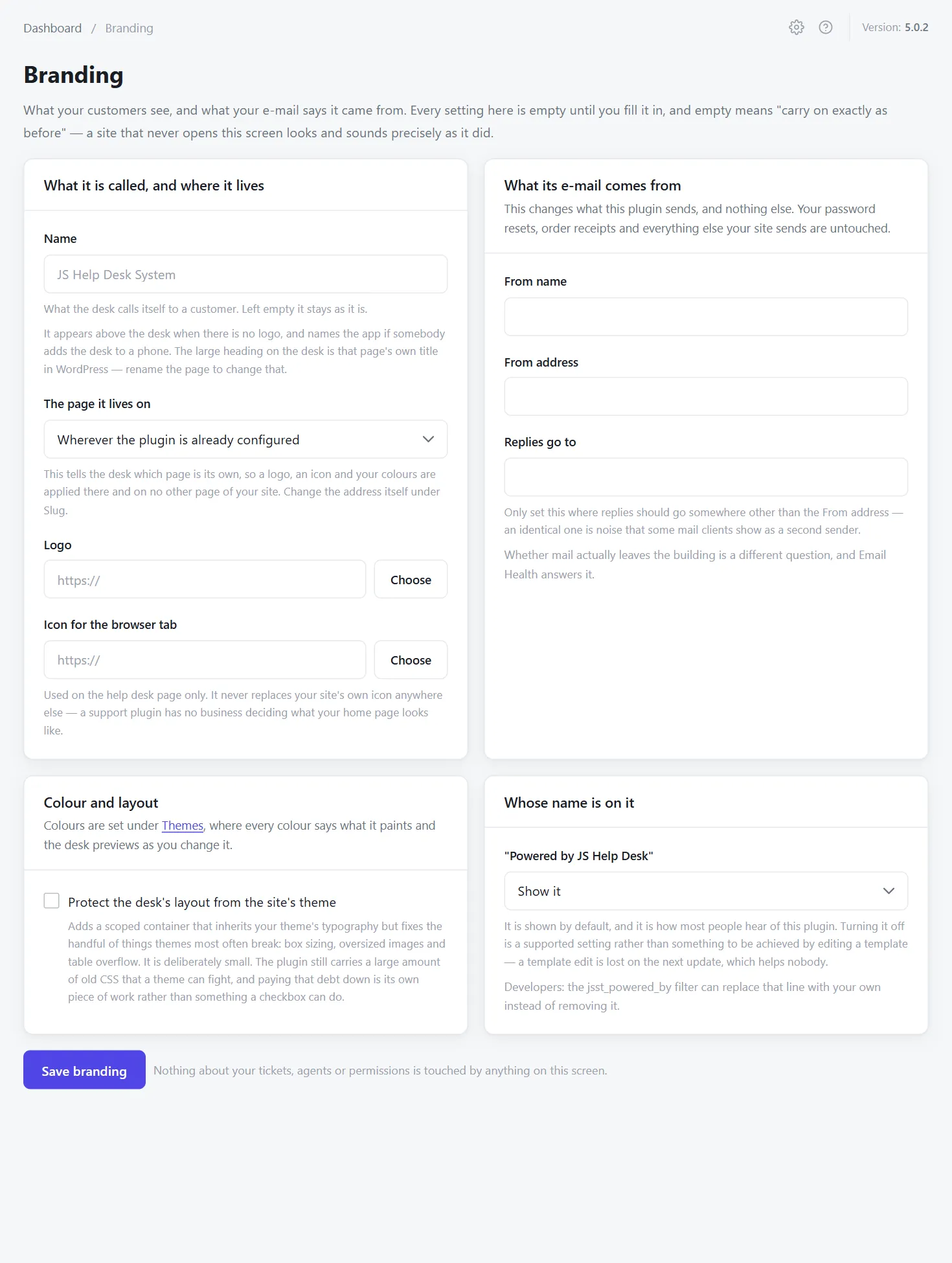
What it is called, and where it lives
Section titled “What it is called, and where it lives”| Field | What it does | Default |
|---|---|---|
| Name | What the desk calls itself to customers. It appears above the desk when there is no logo, and names the app when someone installs the desk on a phone. Left empty, nothing is shown above the desk and the app takes the Title from General. | Empty |
| The page it lives on | Which page of your site is the help desk’s own. The logo, tab icon and colours are applied on that page and no other. | Wherever the plugin is already configured: the Ticket Default Page |
| Logo | An image shown at the top of the desk. Click Choose to pick one from the Media Library, or paste an address. Remove clears it. | Empty |
| Icon for the browser tab | The tab icon on the help desk page only. Your site’s own icon is used everywhere else. | Empty |
The logo links to the help desk page. With a name but no logo, the name is shown instead, with the tab icon beside it if you set one.
The large heading on the desk is the WordPress page’s own title, not Name. To change it, rename the page under Pages.
The page it lives on doesn’t move the help desk. It tells the branding which page to dress; to change the page’s address, use Slug. The tab icon and colours are also applied on any other page that is showing a help desk screen.
What its e-mail comes from
Section titled “What its e-mail comes from”These change only the e-mail this plugin sends. Password resets, order receipts and everything else your site sends are untouched.
| Field | What it does | Default |
|---|---|---|
| From name | The sender name on help desk e-mail. | Empty: unchanged |
| From address | The sender address on help desk e-mail. | Empty: unchanged |
| Replies go to | A reply-to address, for when replies should go somewhere other than the From address. Leave it empty if it would be the same. | Empty |
An address that isn’t a valid e-mail address is saved as empty.
After you save, From address may show a warning:
- With a Gmail, Yahoo, Outlook, Hotmail, Live, AOL or iCloud address, most receiving servers will reject the mail. Use an address at your own domain.
- With an address at a different domain from your site, the mail is only delivered if that domain allows your server to send for it. Otherwise it goes to spam.
Whether mail actually leaves your server is checked on Email Health. For the plugin’s own sender settings, see Sending address.
Colour and layout
Section titled “Colour and layout”Protect the desk’s layout from the site’s theme puts the help desk’s dashboard inside a container that keeps your theme’s fonts but fixes the things themes most often break: box sizing, oversized images and tables running off the side. It is off by default. Try it if your theme makes the help desk look wrong.
Whose name is on it
Section titled “Whose name is on it”“Powered by JS Help Desk” is Show it by default. Do not show it removes the line from the help desk.
Developers can replace the line with their own text using the
jsst_powered_by filter.