

Spam protection
Help Desk → Configurations → Captcha. These settings protect the visitor ticket form and the registration form. Signed-in customers, agents and administrators are never asked.
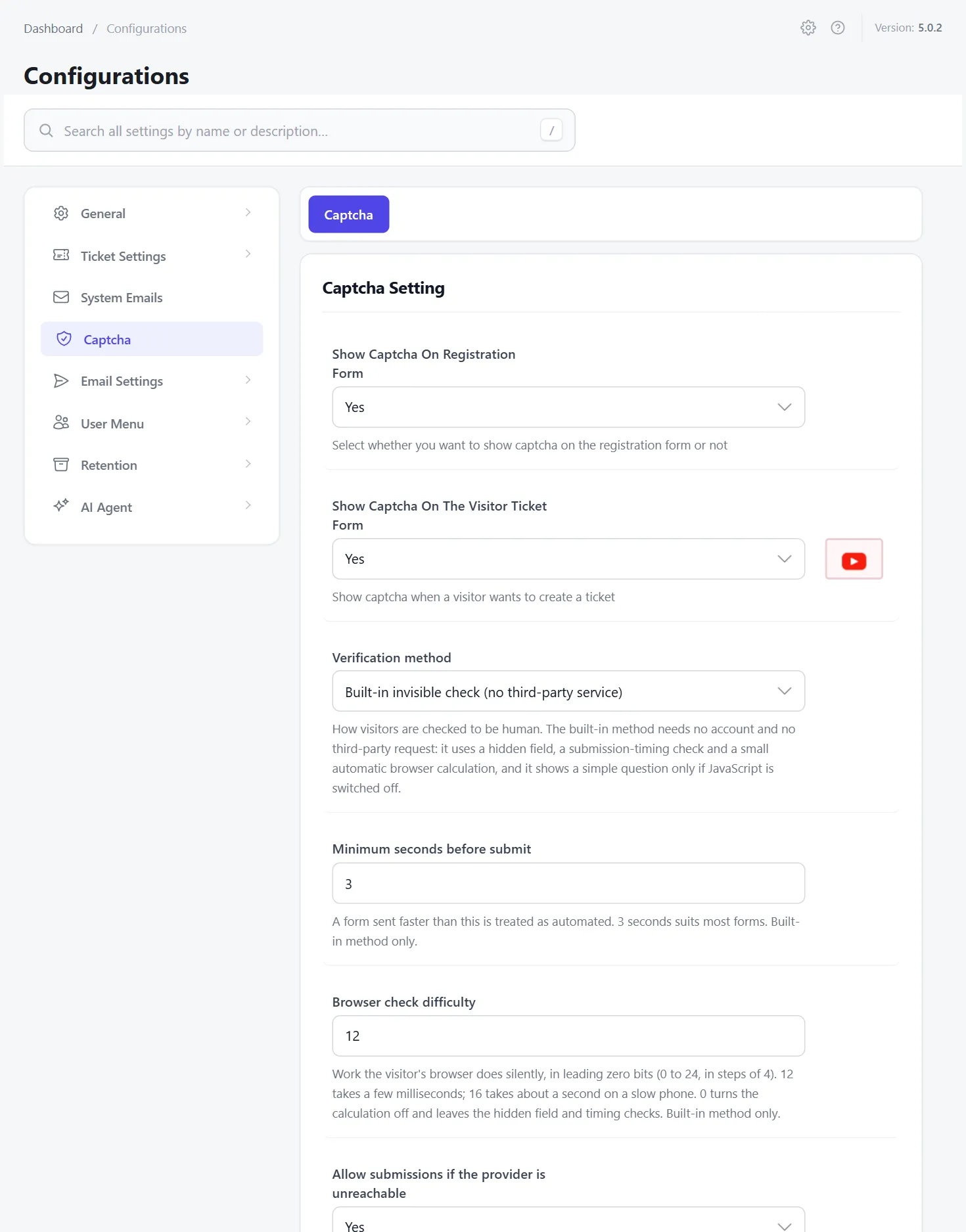
Where it is used
Section titled “Where it is used”| Setting | Default |
|---|---|
| Show Captcha On The Visitor Ticket Form | Yes |
| Show Captcha On Registration Form | Yes |
Verification method
Section titled “Verification method”| Option | |
|---|---|
| Built-in invisible check (no third-party service) | The default. Needs no account and sends nothing to anyone. |
| Cloudflare Turnstile | Needs a site key and secret key from your Cloudflare dashboard. |
| hCaptcha | Needs keys from your hCaptcha account. |
| Google reCAPTCHA v3 (score) | Invisible, scored by Google. Needs v3 keys. |
| Google reCAPTCHA v2 (checkbox) | The “I’m not a robot” box. Needs v2 keys. |
| No verification | No check at all. |
If you choose a service but leave its keys empty, the built-in check is used instead, so the form is never left unprotected by accident.
The built-in check
Section titled “The built-in check”It combines a hidden field that only robots fill in, a check that the form wasn’t sent impossibly fast, and a small calculation the visitor’s browser does silently. Visitors see Checking your browser… for a moment and nothing else.
| Setting | Default | What it does |
|---|---|---|
| Minimum seconds before submit | 3 | A form sent faster than this is treated as automated. |
| Browser check difficulty | 12 | How much work the browser does, from 0 to 24 in steps of 4. 12 takes a few milliseconds; 16 about a second on a slow phone; 0 turns the calculation off. |
A visitor with JavaScript turned off is asked a short sum instead. No-JavaScript Fallback Question sets it: Fallback Calculation Type (addition, subtraction or either), Own Captcha Operands (2 or 3 numbers) and whether subtraction answers are always positive.
Turnstile, hCaptcha and reCAPTCHA
Section titled “Turnstile, hCaptcha and reCAPTCHA”Paste the Site Key and Secret Key from the service into the matching section. For reCAPTCHA v3, Minimum score to accept (default 0.5) sets how strict it is: raise it to refuse more, lower it if real customers are being turned away.
Allow submissions if the provider is unreachable (default Yes, recommended) accepts the ticket and records the failure if the service can’t be reached, rather than blocking your customer.
Submission Rate Limits
Section titled “Submission Rate Limits”| Setting | Default | What it does |
|---|---|---|
| Limit submissions per visitor | Yes | Caps how often one visitor can send the ticket or registration form. |
| Submissions allowed | 5 | How many submissions are allowed within the window. |
| Window in seconds | 600 | The length of that window (600 is ten minutes). |
For blocking specific addresses or whole domains, see Banned e-mail addresses.